Fetching Ticket Context for PRs
Supported Git Platforms: GitHub, GitLab, Bitbucket, Azure DevOps, Gitea
Jira ticket keys (e.g. ABC-123) are extracted from the branch name on every git provider.
Extracting numeric GitHub issue links from the branch name (and the optional branch_issue_regex setting) is currently implemented for GitHub only; support for other providers is planned for a later release.
Overview
PR-Agent streamlines code review workflows by seamlessly connecting with multiple ticket management systems. This integration enriches the review process by automatically surfacing relevant ticket information and context alongside code changes.
Ticket systems supported:
Ticket data fetched:
- Ticket Title
- Ticket Description
- Custom Fields (Acceptance criteria)
- Subtasks (linked tasks)
- Labels
- Attached Images/Screenshots
Affected Tools
Ticket Recognition Requirements:
- GitHub/GitLab issue references can appear in the PR/MR title or description. GitHub also recognizes numeric issue references in the branch name.
- For Jira tickets, you should follow the instructions in Jira Integration in order to authenticate with Jira.
- For Asana tickets, see Asana Integration.
Describe tool
PR-Agent will recognize the ticket and use the ticket content (title, description, labels) to provide additional context for the code changes. By understanding the reasoning and intent behind modifications, the LLM can offer more insightful and relevant code analysis.
Review tool
Similarly to the describe tool, the review tool will use the ticket content to provide additional context for the code changes.
In addition, this feature will evaluate how well a Pull Request (PR) adheres to its original purpose/intent as defined by the associated ticket or issue. Each ticket will be assigned a label (Compliance/Alignment level), Indicates the degree to which the PR fulfills its original purpose:
- Fully Compliant
- Partially Compliant
- Not Compliant
- PR Code Verified
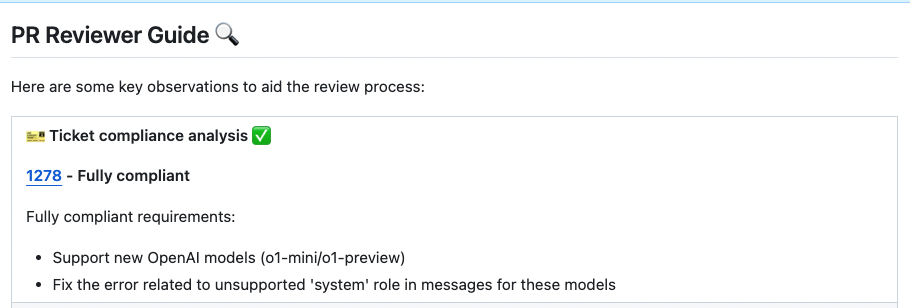
A PR Code Verified label indicates the PR code meets ticket requirements, but requires additional manual testing beyond the code scope. For example - validating UI display across different environments (Mac, Windows, mobile, etc.).
Configuration options
By default, the `review` tool will automatically validate if the PR complies with the referenced ticket.
If you want to disable this feedback, add the following line to your configuration file:

```toml
[pr_reviewer]
require_ticket_analysis_review=false
```
-
If you set:
```toml
[pr_reviewer]
check_pr_additional_content=true
```
(default: `false`)

the `review` tool will also validate that the PR code doesn't contain any additional content that is not related to the ticket. If it does, the PR will be labeled at best as `PR Code Verified`, and the `review` tool will provide a comment with the additional unrelated content found in the PR code.
GitHub/GitLab Issues Integration
PR-Agent will automatically recognize GitHub/GitLab issues mentioned in the PR/MR title or description and fetch the issue content. Examples of valid GitHub/GitLab issue references:
https://github.com/<ORG_NAME>/<REPO_NAME>/issues/<ISSUE_NUMBER>orhttps://gitlab.com/<ORG_NAME>/<REPO_NAME>/-/issues/<ISSUE_NUMBER>#<ISSUE_NUMBER><ORG_NAME>/<REPO_NAME>#<ISSUE_NUMBER>
Full GitHub issue URLs are recognized on the configured instance's HTTPS web origin, including GitHub Enterprise URLs such as https://github.example.com/<ORG_NAME>/<REPO_NAME>/issues/<ISSUE_NUMBER>.
Full GitHub issue URLs on other origins are ignored.
GitHub processes references from the description first, then the branch name, then the title. GitLab processes description references before title references. Repeated identical references do not add lookups, and title references use the existing ticket lookup and result limits without displacing earlier sources.
The optional config.description_issue_regex setting applies only to the GitHub PR description. GitHub titles use
the built-in reference formats above, including local #<ISSUE_NUMBER> references of up to six digits.
Branch names can also be used to link issues, for example:
123-fix-bug(where123is the issue number)
This branch-name detection applies only when the git provider is GitHub. Support for other platforms is planned for later.
By default, GitHub ticket context is limited to the PR's own repository. Issues and sub-issues in another
repository require explicit host approval through config.repo_context_sibling_repos:
[config]
repo_context_sibling_repos = ["myorg/shared-tickets"]
Only canonical repositories under the PR repository's resolved owner are accepted. For private or internal repositories, the command requester must also have read access; CLI runs use the PR author when no command actor is available. Repository settings and comment arguments cannot change this allowlist. An empty list disables cross-repository ticket reads, including public repositories. Approve only content that may be included in the consuming PR's review or description. Ticket lookup limits are separate from the sibling-file limit. PyGithub may follow an issue transfer, but results from a different repository are discarded before prompt use. Reference a transferred issue by its current repository and number.
Asana Integration
PR-Agent can detect Asana task references in PR descriptions, fetch the referenced tasks through the Asana API, and include their titles, descriptions, and tags in the ticket compliance check.
Supported reference formats:
- Legacy links:
https://app.asana.com/0/{project_gid}/{task_gid} - Current permalinks:
https://app.asana.com/1/{workspace_gid}/task/{task_gid} - Current project links:
https://app.asana.com/1/{workspace_gid}/project/{project_gid}/task/{task_gid} - Current Home links:
https://app.asana.com/1/{workspace_gid}/home/task/{task_gid} - Task comment links ending in
/comment/{comment_gid}(the parent task is fetched)
How to link a PR to an Asana task:
Include an Asana task URL in your PR description. PR-Agent will detect it automatically and include it in the related tickets list.
Authentication
Create an Asana personal access token with access to the
tasks that PR-Agent should read. Configure it in .secrets.toml:
[asana]
api_token = "YOUR_PERSONAL_ACCESS_TOKEN"
For environment-based deployments, set the equivalent Dynaconf environment variable:
ASANA__API_TOKEN="YOUR_PERSONAL_ACCESS_TOKEN"
The token is sent only to Asana's fixed task API endpoint as a Bearer token. When no token is configured or a task is
not accessible to that token, PR-Agent skips that Asana task instead of evaluating compliance against placeholder
content. API request timeout can be adjusted with asana.request_timeout (10 seconds by default, capped at 60 seconds).
Ticket limits
PR-Agent fetches the first three detected Asana tasks at most, preserving their description order. This is an additive, provider-specific limit, with native tickets listed before Asana tasks:
- On GitHub, the existing limit of three GitHub issues is preserved, plus up to three Asana tasks.
- On Azure DevOps, all linked work items are preserved, plus up to three Asana tasks.
- On other providers, up to three detected Asana tasks can supply ticket context.
Keeping these limits separate prevents Asana references from silently displacing native tickets and avoids changing the established ticket-extraction behavior of existing providers.
Jira Integration
Jira lookup needs the bitbucket extra: pip install "pr-agent[bitbucket]". Without it the lookup is skipped with a warning.
Only Jira Cloud is supported. The base URL is derived from a validated site name
(jira_site → https://<site>.atlassian.net) rather than taken as a free-form URL, so
the configured destination is always an Atlassian Cloud host. Jira Server / Data Center
(self-hosted) uses a free-form host and is not supported yet; it can be added once
base-URL handling for the self-hosted case is settled.
Jira Cloud
Email/Token Authentication
You can create an API token from your Atlassian account:
-
Log in to https://id.atlassian.com/manage-profile/security/api-tokens.
-
Click Create API token.
-
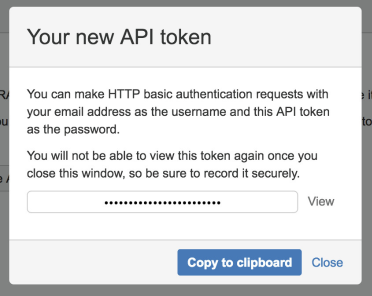
From the dialog that appears, enter a name for your new token and click Create.
-
Click Copy to clipboard.
- In the PR-Agent host configuration (the secrets file or environment variables such as
JIRA__JIRA_SITE) add the following lines. A repository's.pr_agent.tomlcannot set them:
[jira]
jira_site = "<JIRA_SITE>"   # the "<site>" in https://<site>.atlassian.net (e.g. "mycompany")
jira_api_email = "YOUR_EMAIL"
jira_api_token = "YOUR_API_TOKEN"
jira_site is your Jira Cloud site name — the part before .atlassian.net (for
https://mycompany.atlassian.net, the site is mycompany). PR-Agent builds the base URL
as https://<jira_site>.atlassian.net; it does not accept a full URL, so configuration
cannot redirect the authenticated request to another host. Store jira_api_email and
jira_api_token as secrets (environment variables or the secrets file), not in
repository-committed configuration.
Acceptance criteria / requirements (optional)
To include a ticket's acceptance criteria in the analysis, set jira_requirements_field
to the id of the custom field that holds it. The field id is specific to your Jira
instance (for example customfield_10127); leave it empty to skip requirements.
[jira]
jira_requirements_field = "customfield_10127"
Project key allowlist (optional)
Ticket detection matches any PROJECT-123 shaped text, so strings like SHA-256,
UTF-8 or ISO-8601 in a title or description each cost an authenticated lookup that
returns 404. If your deployment works with a known set of Jira projects, list their keys
in the host's project_keys; keys with any other prefix are then dropped before any lookup (they are
named once at debug level in the log). Leave the list empty to look up every key found.
project_keys, jira_site and jira_api_email are host-only: a repository's .pr_agent.toml
or a comment command cannot change them.
[jira]
project_keys = ["PROJ", "OPS"]
Entries are plain upper-case project keys (letters only, as Jira writes them); anything else (a lower-case label, a full ticket key, a URL, a blank entry) is ignored with a warning. If the list is set but none of its entries is valid, no Jira lookup is made at all until it is fixed, so a typo cannot silently widen the lookup again. Only a missing option, the empty list, and an environment override set to the empty string mean "look up every key".
How to link a PR to a Jira ticket
To integrate with Jira, you can link your PR to a ticket using either of these methods:
Method 1: Description Reference:
Include a ticket reference in your PR description, using either the complete URL format https://<JIRA_SITE>.atlassian.net/browse/ISSUE-123 or the shortened ticket ID ISSUE-123 (without prefix or suffix for the shortened ID).
Method 2: Branch Name Detection:
Name your branch with the ticket ID as a prefix (e.g., ISSUE-123-feature-description or ISSUE-123/feature-description).