Azure DevOps Integration
Azure DevOps Pipeline
You can use a pre-built Action Docker image to run PR-Agent as an Azure DevOps pipeline.
Add the following file to your repository under azure-pipelines.yml:
# Opt out of CI triggers
trigger: none

# Configure PR trigger
# pr:
#   branches:
#     include:
#     - '*'
#   autoCancel: true
#   drafts: false

# NOTE for Azure Repos Git:
# Azure Repos does not honor YAML pr: triggers. Configure Build Validation
# via Branch Policies instead (see note below). You can safely omit pr:.

stages:
- stage: pr_agent
  displayName: 'PR Agent Stage'
  jobs:
  - job: pr_agent_job
    displayName: 'PR Agent Job'
    pool:
      vmImage: 'ubuntu-latest'
    container:
      image: pragent/pr-agent:latest
      options: --entrypoint ""
    variables:
      - group: pr_agent
    steps:
    - script: |
        echo "Running PR Agent action step"

        # Construct PR_URL
        PR_URL="${SYSTEM_COLLECTIONURI}${SYSTEM_TEAMPROJECT}/_git/${BUILD_REPOSITORY_NAME}/pullrequest/${SYSTEM_PULLREQUEST_PULLREQUESTID}"
        echo "PR_URL=$PR_URL"

        # Extract organization URL from System.CollectionUri
        ORG_URL=$(echo "$(System.CollectionUri)" | sed 's/\/$//') # Remove trailing slash if present
        echo "Organization URL: $ORG_URL"

        export azure_devops__org="$ORG_URL"
        export config__git_provider="azure"

        pr-agent --pr_url="$PR_URL" describe
        pr-agent --pr_url="$PR_URL" review
      env:
        azure_devops__pat: $(azure_devops_pat)
        openai__key: $(OPENAI_KEY)
      displayName: 'Run PR-Agent'
This script will run PR-Agent on every new merge request, with the review and describe commands.
Note that you need to add the azure_devops_pat and OPENAI_KEY variables to the pr_agent variable group in the Azure DevOps pipeline settings (Pipelines -> Library -> + Variable group). The pipeline maps azure_devops_pat to the azure_devops__pat environment variable:
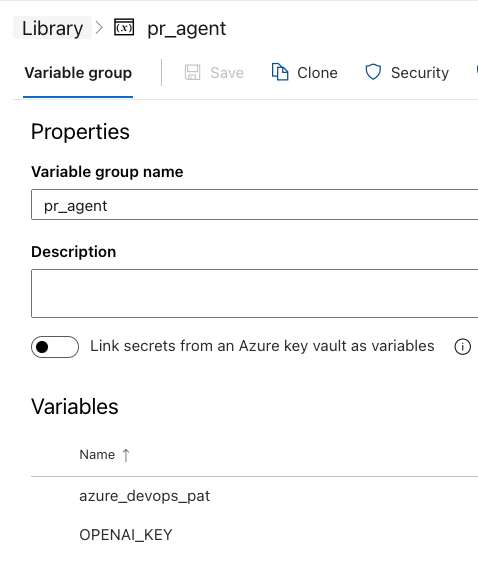
Make sure to give pipeline permissions to the pr_agent variable group.
Note that Azure Pipelines lacks support for triggering workflows from PR comments. If you find a viable solution, please contribute it to our issue tracker
Azure Repos Git PR triggers and Build Validation
Azure Repos Git does not use YAML pr: triggers for pipelines. Instead, configure Build Validation on the target branch to run the PR Agent pipeline for pull requests:
- Go to Project Settings → Repositories → Branches.
- Select the target branch and open Branch Policies.
- Under Build Validation, add a policy:
- Select the PR Agent pipeline (the
azure-pipelines.ymlabove). - Set it as Required.
- Select the PR Agent pipeline (the
- Remove the
pr:section from your YAML (not needed for Azure Repos Git).
This distinction applies specifically to Azure Repos Git. Other providers like GitHub and Bitbucket Cloud can use YAML-based PR triggers.
Azure DevOps from CLI
To use Azure DevOps provider use the following settings in configuration.toml:
[config]
git_provider="azure"
Azure DevOps provider supports PAT token or DefaultAzureCredential authentication. PAT is faster to create, but has built-in expiration date, and will use the user identity for API calls. Using DefaultAzureCredential you can use managed identity or Service principle, which are more secure and will create separate ADO user identity (via AAD) to the agent.
If PAT was chosen, you can assign the value in .secrets.toml. If DefaultAzureCredential was chosen, you can assigned the additional env vars like AZURE_CLIENT_SECRET directly, or use managed identity/az cli (for local development) without any additional configuration. in any case, 'org' value must be assigned in .secrets.toml:
[azure_devops]
org = "https://dev.azure.com/YOUR_ORGANIZATION/"
# pat = "YOUR_PAT_TOKEN" needed only if using PAT for authentication
Persistent reviews resolve the posting account through Azure DevOps using the same credentials as comment writes.
Repeated /review runs update that account's existing review without requiring an agent_identity setting,
including when Jira ticket context is enabled. This applies to pipelines, CLI runs, and webhook deployments.
If identity lookup is unavailable, configure azure_devops_server.agent_identity in the host environment or settings
with the posting account's GUID, unique name, or descriptor. Repository settings and comment arguments cannot set it.
An explicit setting takes precedence over automatic resolution; display names
do not prove comment ownership. If ownership cannot be verified, an existing review is preserved and a standalone
result is posted.
Azure DevOps Webhook
To trigger from an Azure webhook, you need to manually add a webhook. Build the webhook Docker image from the repository root and deploy it:
docker build . -t pr-agent:azure_devops_webhook --target azure_devops_webhook -f docker/Dockerfile
Point the webhook at the server's HTTPS root URL (for example, https://pr-agent.example.com/);
the server receives requests at POST / and listens on the port set by PORT (default 3000).
Use the "Pull request created" type to trigger a review, or "Pull request commented on" to trigger a supported
/<command> <args> comment. API v2.0 is required for comment events.
Questions can also address the agent without a slash command. Mention the Azure DevOps identity used by PR-Agent at
the start of a PR or line comment. PR-Agent discovers that identity from its earlier comments, answers in the same
thread, and uses the existing thread discussion as context. Generic phrases such as hi agent do not trigger a
response.
For the first mention before PR-Agent has posted on the pull request, or when its Azure DevOps identity changes, configure a stable identity (GUID/ID, unique name, or descriptor). A list can be used during an identity transition:
[azure_devops_server]
agent_identity = "<agent identity>"
Webhook authentication is required. Create a username/password pair and configure the same values on the server and in the Azure DevOps webhook's Basic authentication settings. Azure DevOps sends these credentials with each request:
[azure_devops_server]
webhook_username = "<basic auth user>"
webhook_password = "<basic auth password>"
The server rejects webhook requests with HTTP 403 if either setting is missing or empty. With both settings configured, requests without valid Basic credentials receive HTTP 401.
⚠️ Ensure that the webhook endpoint is only accessible over HTTPS to mitigate the risk of credential interception when using basic authentication.