Describe
Overview
Generate a PR title, type, summary, code walkthrough and labels.
The tool can be triggered automatically every time a new PR is opened, or it can be invoked manually by commenting on any PR:
/describe
Example usage
Manual triggering
Invoke the tool manually by commenting /describe on any PR:
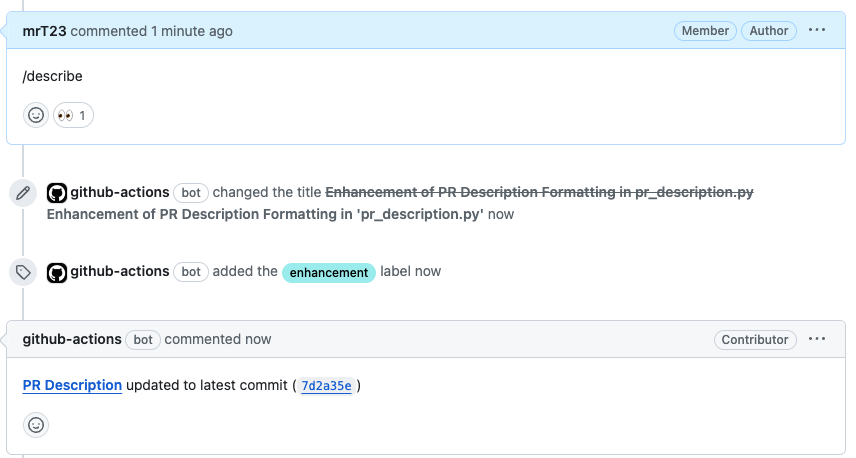
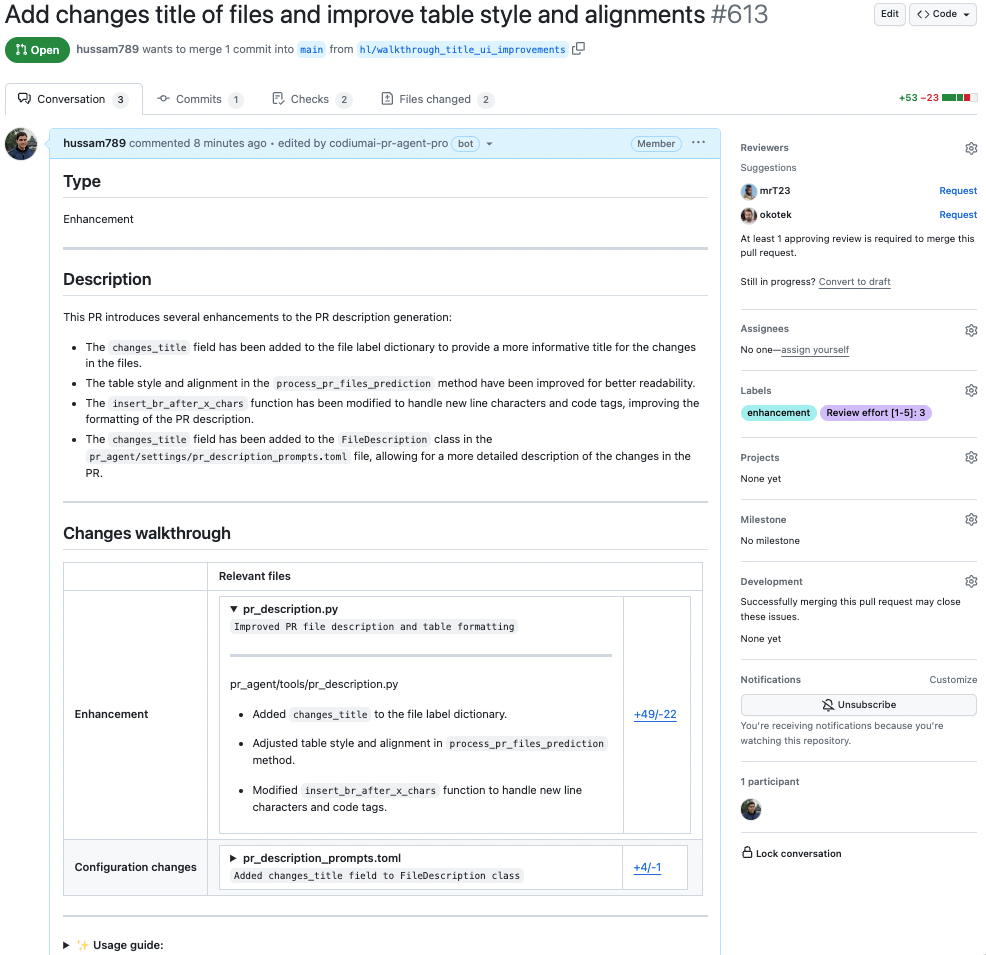
After ~30 seconds, the tool will generate a description for the PR:
While a large PR's chunks run, the temporary Preparing PR description... comment is rewritten in place, for example Preparing PR description... analyzed 2 of 3 chunks; once every chunk has settled, , 1 chunk failed is added if a chunk gave up. This needs config.publish_output_progress and a provider that can edit and remove comments; single-chunk runs keep the plain placeholder.
If you want to edit configurations, add the relevant ones to the command:
/describe --pr_description.some_config1=... --pr_description.some_config2=...
Automatic triggering
To run the describe automatically when a PR is opened, define in a configuration file:
[github_app]
pr_commands = [
    "/describe",
    ...
]

[pr_description]
publish_labels = true
...
- The
pr_commandslists commands that will be executed automatically when a PR is opened. - The
[pr_description]section contains the configurations for thedescribetool you want to edit (if any).
Preserving the original user description
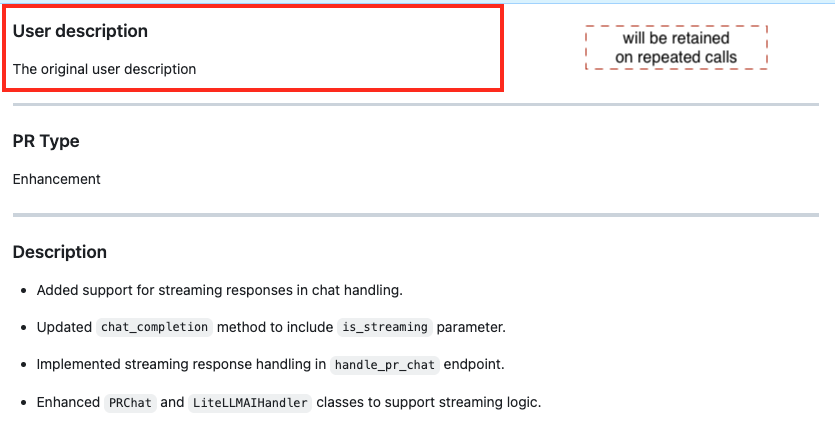
By default, PR-Agent tries to preserve your original PR description by placing it above the generated content. This requires including your description during the initial PR creation.
"PR-Agent removed the original description from the PR. Why"?
From our experience, there are two possible reasons:
-
If you edit the description while the automated tool is running, a race condition may occur, potentially causing your original description to be lost. Hence, create a description before launching the PR.
-
When updating PR descriptions, the
/describetool considers everything above the "PR Type" field as user content and will preserve it. Everything below this marker is treated as previously auto-generated content and will be replaced.
Sequence Diagram Support
The /describe tool includes a Mermaid sequence diagram showing component/function interactions.
This option is enabled by default via the pr_description.enable_pr_diagram param.
The direction of the diagram adapts to its shape. A diagram whose longest chain of nodes exceeds pr_description.pr_diagram_direction_threshold is drawn top-down rather than left-to-right, so that wide diagrams are not scaled down until they become unreadable. Set pr_description.pr_diagram_direction to LR or TD to pin the direction instead.
Configuration options
The descriptions below explain each option's behavior. See the relevant sections in
configuration.toml
for the authoritative default values.
Possible configurations
| publish_labels | If set to true, the tool will publish labels to the PR. |
| publish_description_as_comment | If set to true, the tool will publish the description as a comment to the PR. If false, it will overwrite the original description. |
| publish_description_as_comment_persistent | If set to true and `publish_description_as_comment` is true, the tool will publish the description as a persistent comment to the PR. |
| add_original_user_description | If set to true, the tool will add the original user description to the generated description. |
| generate_ai_title | If set to true, the tool will also generate an AI title for the PR. |
| extra_instructions | Optional extra instructions to the tool. For example: "focus on the changes in the file X. Ignore change in ..." |
| enable_pr_type | If set to false, it will not show the `PR type` as a text value in the description content. |
| enable_pr_description | If set to false, the AI-generated summary section will not be requested from the model, nor shown in the description content. The other sections (diagram, changes walkthrough) are unaffected. |
| final_update_message | If set to true, it will add a comment message [`PR Description updated to latest commit...`](https://github.com/the-pr-agent/pr-agent/pull/499#issuecomment-1837412176) after finishing calling `/describe`. |
| enable_semantic_files_types | If set to true, "Changes walkthrough" section will be generated. |
| file_table_collapsible_open_by_default | Controls whether the file list in the "Changes walkthrough" section is initially open or closed. |
| collapsible_file_list | If set to true, the file list in the "Changes walkthrough" section will be collapsible. If set to "adaptive", the file list will be collapsible only when the number of files exceeds collapsible_file_list_threshold. |
| enable_large_pr_handling | If set to true, in case of a large PR the tool will make several calls to the AI and combine them to be able to cover more files. |
| enable_help_text | If set to true, the tool will display a help text in the comment. |
| enable_pr_diagram | If set to true, the tool will generate a Mermaid flowchart summarizing the main pull request changes. This field remains empty if not applicable. |
| pr_diagram_direction | Direction of the generated Mermaid flowchart: adaptive, LR or TD. With adaptive, the direction is chosen from the shape of the diagram. |
| pr_diagram_direction_threshold | With adaptive direction, a diagram whose longest chain exceeds this many nodes is drawn top-down instead of left-to-right. |
| auto_create_ticket | If set to true, this will automatically create a ticket in the ticketing system when a PR is opened. |
Markers template
To enable markers, set pr_description.use_description_markers=true.
Markers enable to easily integrate user's content and auto-generated content, with a template-like mechanism.
For example, if the PR original description was:
User content...

## PR Type:
pr_agent:type

## PR Description:
pr_agent:summary

## PR Walkthrough:
pr_agent:walkthrough

## PR Diagram:
pr_agent:diagram
The marker pr_agent:type will be replaced with the PR type, pr_agent:summary will be replaced with the PR summary, pr_agent:walkthrough will be replaced with the PR walkthrough, and pr_agent:diagram will be replaced with the sequence diagram (if enabled).
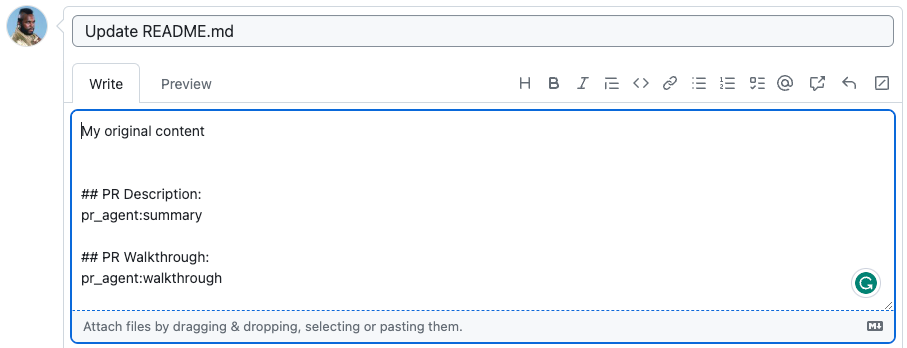
becomes
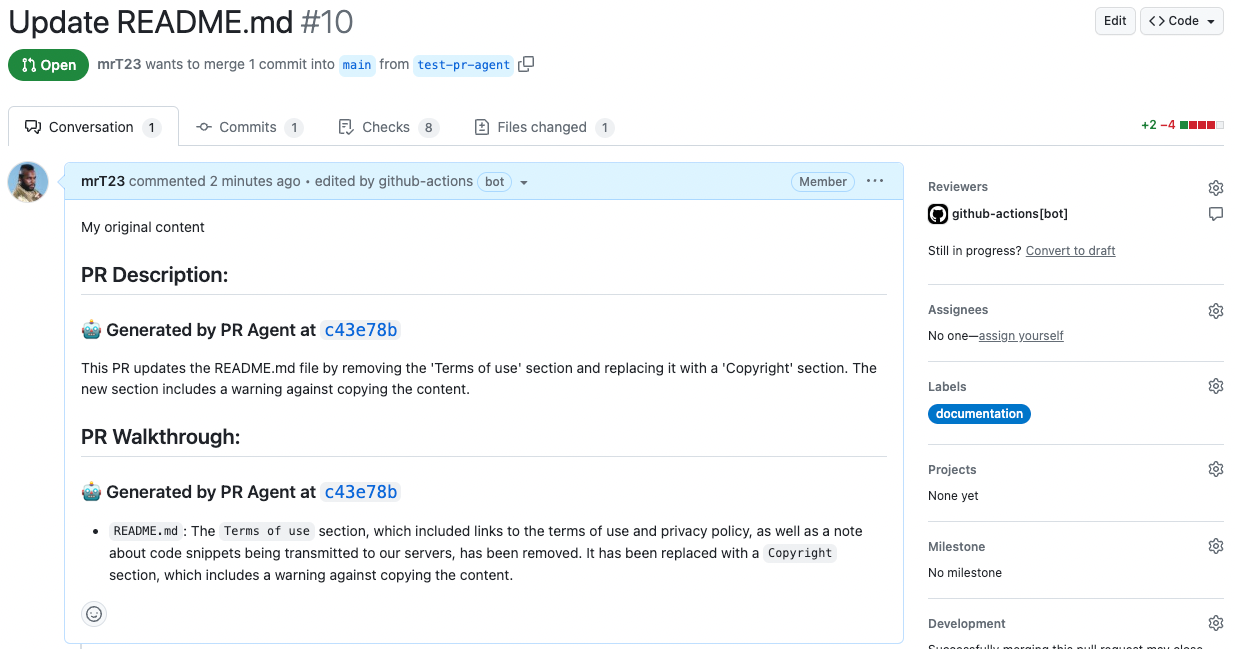
Configuration params:
use_description_markers: if set to true, the tool will use markers template. It replaces every marker of the formpr_agent:marker_namewith the relevant content. Default is false.include_generated_by_header: if set to true, the tool will add a dedicated header: 'Generated by PR Agent at ...' to any automatic content. Default is true.diagram: if present as a marker, will be replaced by the PR sequence diagram (if enabled).
Custom labels
The default labels of the describe tool are quite generic, since they are meant to be used in any repo: [Bug fix, Tests, Enhancement, Documentation, Other].
You can define custom labels that are relevant for your repo and use cases. Custom labels can be defined in a configuration file, or directly in the repo's labels page.
Make sure to provide proper title, and a detailed and well-phrased description for each label, so the tool will know when to suggest it. Each label description should be a conditional statement, that indicates if to add the label to the PR or not, according to the PR content.
Auto-remove custom label when no longer relevant
If the custom label is no longer relevant, it will be automatically removed from the PR by running the generate_labels tool or the describe tool.
Handle custom labels from a configuration file
Example for a custom labels configuration setup in a configuration file:
[config]
enable_custom_labels=true


[custom_labels."sql_changes"]
description = "Use when a PR contains changes to SQL queries"

[custom_labels."test"]
description = "use when a PR primarily contains new tests"

...
Handle custom labels from the Repo's labels page
You can also control the custom labels that will be suggested by the describe tool from the repo's labels page:
- GitHub : go to
https://github.com/{owner}/{repo}/labels(or click on the "Labels" tab in the issues or PRs page) - GitLab : go to
https://gitlab.com/{owner}/{repo}/-/labels(or click on "Manage" -> "Labels" on the left menu)
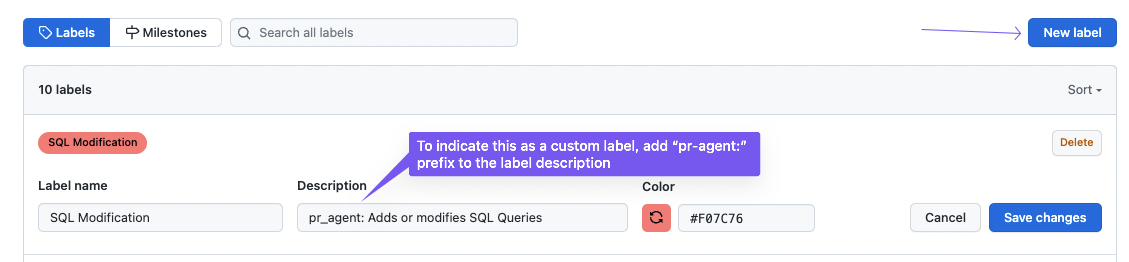
Now add/edit the custom labels. they should be formatted as follows:
- Label name: The name of the custom label.
- Description: Start the description of with prefix
pr_agent:, for example:pr_agent: Description of when AI should suggest this label.
Examples for custom labels:
Main topic:performance- pr_agent:The main topic of this PR is performanceNew endpoint- pr_agent:A new endpoint was added in this PRSQL query- pr_agent:A new SQL query was added in this PRDockerfile changes- pr_agent:The PR contains changes in the Dockerfile- ...
The description should be comprehensive and detailed, indicating when to add the desired label. For example:
Usage Tips
- When you first install PR-Agent app, the default mode for the describe tool is:
pr_commands = ["/describe", ...]
meaning the describe tool will run automatically on every PR, with the default configurations.
-
Markers are an alternative way to control the generated description, to give maximal control to the user. If you set:
pr_commands = ["/describe --pr_description.use_description_markers=true", ...]the tool will replace every marker of the form
pr_agent:marker_namein the PR description with the relevant content, wheremarker_nameis one of the following: *type: the PR type. *summary: the PR summary. *walkthrough: the PR walkthrough. -
Note that when markers are enabled, if the original PR description does not contain any markers, the tool will not alter the description at all.