Improve
Overview
Generate actionable code suggestions for improving the PR. The tool can be triggered automatically every time a new PR is opened, or it can be invoked manually by commenting on any PR:
/improve
How it looks
- Suggestions Overview
- Selecting a specific suggestion
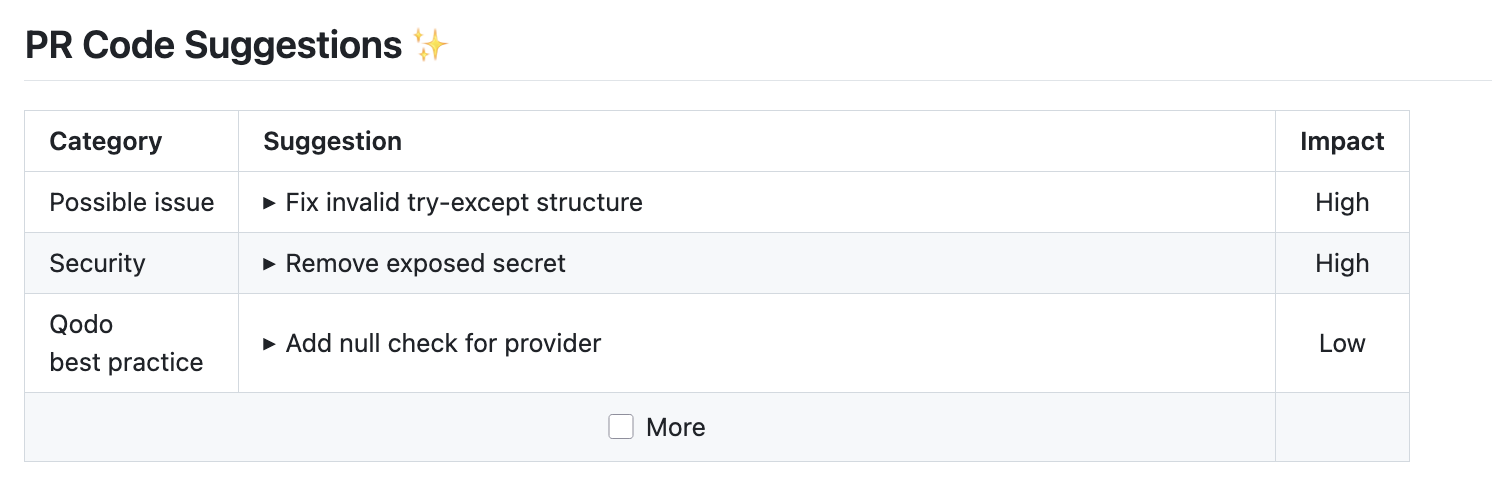
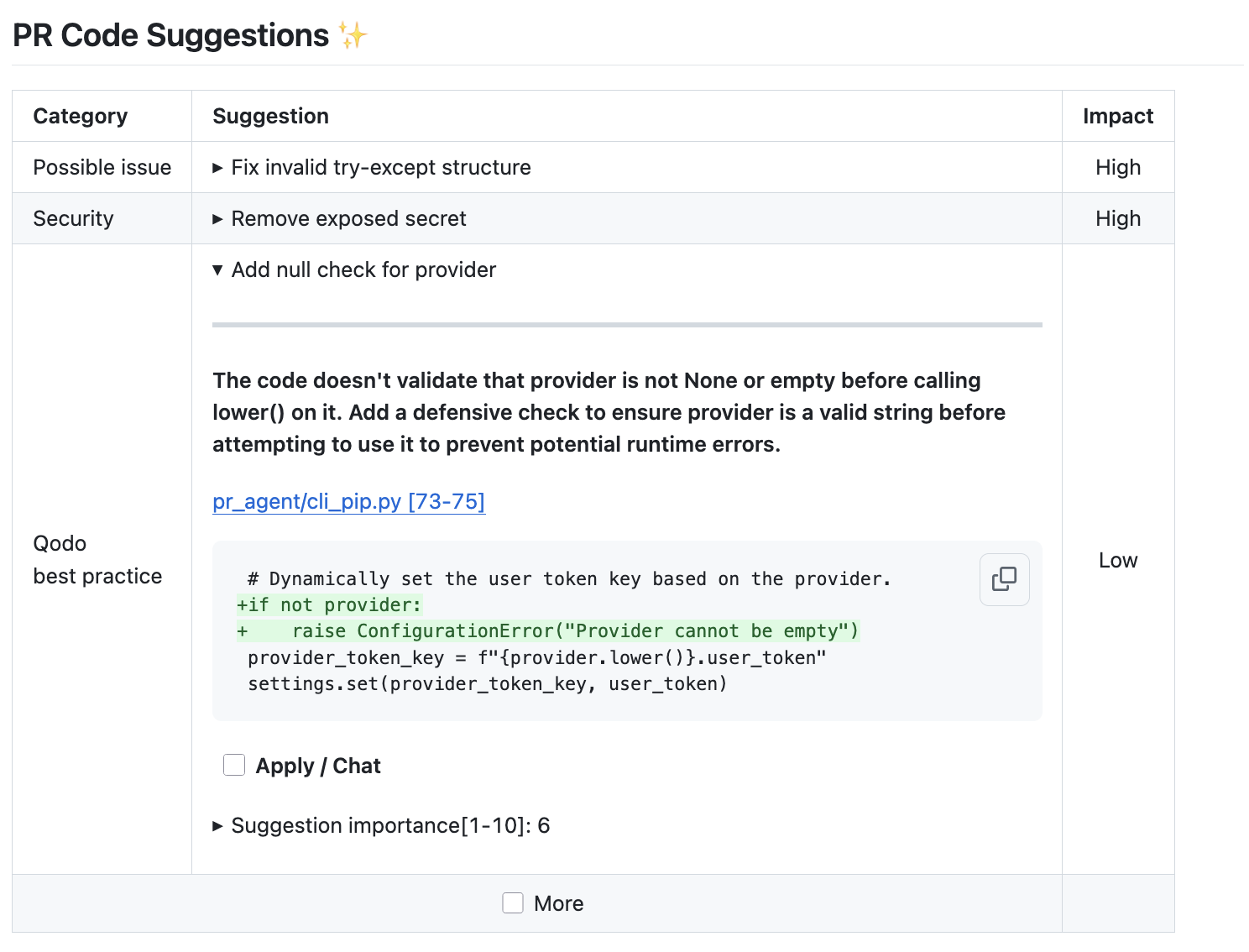
Example usage
Manual triggering
Invoke the tool manually by commenting /improve on any PR. The code suggestions by default are presented as a single comment:
To edit configurations related to the improve tool, use the following template:
/improve --pr_code_suggestions.some_config1=... --pr_code_suggestions.some_config2=...
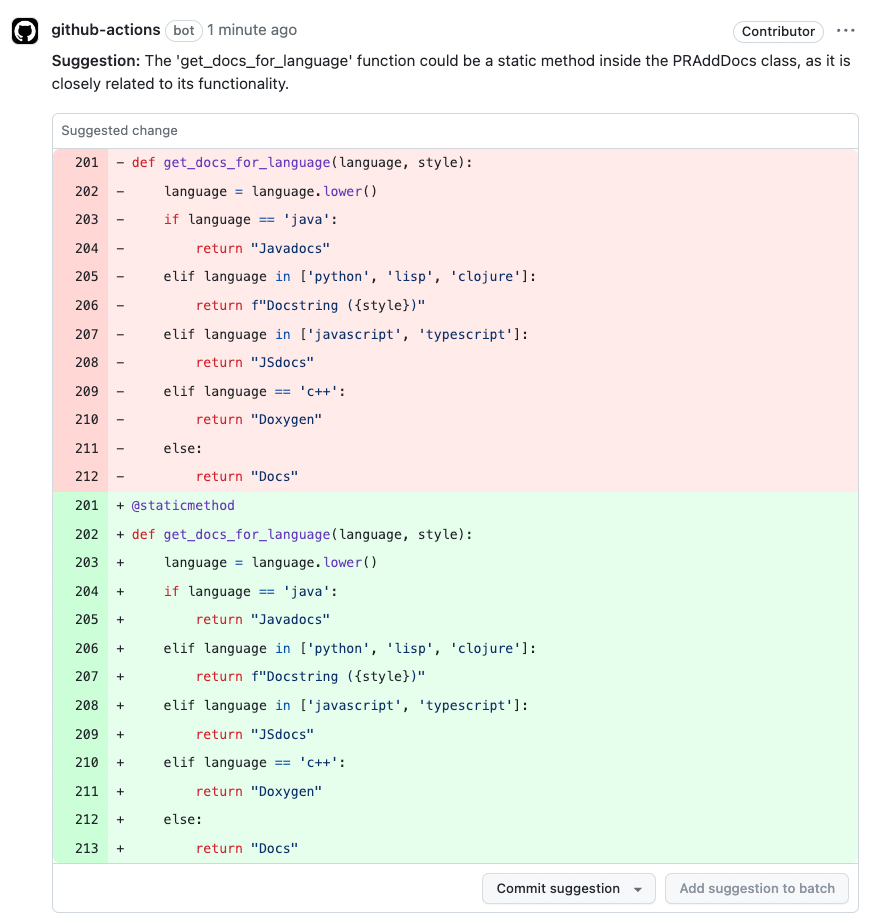
For example, you can present suggestions with verified replacement ranges as committable code comments by running:
/improve --pr_code_suggestions.committable_code_suggestions=true
Suggestions whose replacement ranges cannot be verified remain regular comments without an apply action.
The key was spelled commitable_code_suggestions until the pre-1.0 typo fix. That spelling keeps
working but is deprecated: it logs a warning and will be removed in 1.0. Rename it to
committable_code_suggestions.
If batch publication fails, /improve retries each suggestion individually. If every retry fails,
it reports a failure instead of silently removing the progress comment. With
config.propagate_tool_errors=true, the publication error is also raised to the caller.
Regular fallback comments and coverage notices are published before the error is reported.
When this fallback output succeeds, it is retained without an additional failure banner;
error propagation still follows config.propagate_tool_errors.
If any individual retry succeeds, the existing partial-recovery behavior is preserved.
Automatic triggering
To run the improve automatically when a PR is opened, define in a configuration file:
[github_app]
pr_commands = [
    "/improve",
    ...
]

[pr_code_suggestions]
num_code_suggestions_per_chunk = ...
...
- The
pr_commandslists commands that will be executed automatically when a PR is opened. - The
[pr_code_suggestions]section contains the configurations for theimprovetool you want to edit (if any)
Incremental suggestions
On Azure DevOps, run /improve -i to analyze only changes made after the latest code-suggestions pass. The first
incremental run analyzes the full pull request when no earlier suggestions comment exists. A later run with no new
changes exits without calling the model.
Table vs Committable code comments
PR-Agent supports two modes for presenting code suggestions:
-
Table mode
-
Inline Committable code comments mode.
The table format offers several key advantages:
- Reduced noise: Creates a cleaner PR experience with less clutter
- Quick overview and prioritization: Enables quick review of one-liner summaries, impact levels, and easy prioritization
- High-level suggestions: High-level suggestions that aren't tied to specific code chunks are presented only in the table mode
- Centralized tracking: Shows suggestion implementation status in one place
- IDE integration: Allows applying suggestions directly in your IDE via the CLI tool
Table mode is the default of PR-Agent, and is recommended approach for most users due to these benefits.
Teams with specific preferences can enable committable code comments mode in their local configuration, or use dual publishing mode.
Note - due to platform limitations, Bitbucket cloud and server supports only committable code comments mode.
Extra instructions and best practices
The improve tool can be further customized by providing additional instructions and best practices to the AI model.
Extra instructions
You can use the extra_instructions configuration option to give the AI model additional instructions for the improve tool.
Be specific, clear, and concise in the instructions. With extra instructions, you are the prompter.
Examples for possible instructions:
[pr_code_suggestions]
extra_instructions="""\
(1) Answer in Japanese
(2) Don't suggest to add try-except block
(3) Ignore changes in toml files
...
"""
Use triple quotes to write multi-line instructions. Use bullet points or numbers to make the instructions more readable.
Best practices
Repository context files supported: GitHub, GitLab, Gitea, Bitbucket, Azure DevOps
The open-source PR-Agent package does not load best_practices.md automatically. To use a best-practices file,
add it to config.repo_context_files:
[config]
repo_context_files = ["AGENTS.md", "best_practices.md"]
This fallback supports GitHub, GitLab, Gitea, Bitbucket, and Azure DevOps. Repository context files are read
from the default branch by default and are limited by config.repo_context_max_lines (500 lines by default).
Set config.repo_context_from_default_branch = false to read them from the pull request's target branch instead.
Providers without repository file fetching log a warning and skip this context.
Writing effective best practices files
The following guidelines apply to all best practices files:
- Write clearly and concisely
- Include brief code examples when helpful with before/after patterns
- Focus on project-specific guidelines that will result in relevant suggestions you actually want to get
- Keep each file short and focused, since:
- AI models may not process effectively very long documents
- Long files tend to contain generic guidelines already known to AI
config.repo_context_max_lineslimits the total rendered repository context, including wrapper and truncation lines.
- Use pattern-based structure rather than simple bullet points for better clarity
Example of a best practices file
Pattern 1: Add proper error handling with try-except blocks around external function calls.
Example code before:
# Some code that might raise an exception
return process_pr_data(data)
Example code after:
try:
    # Some code that might raise an exception
    return process_pr_data(data)
except Exception as e:
    logger.exception("Failed to process request", extra={"error": e})
Pattern 2: Add defensive null/empty checks before accessing object properties or performing operations on potentially null variables to prevent runtime errors.
Example code before:
def get_pr_code(pr_data):
    if "changed_code" in pr_data:
        return pr_data.get("changed_code", "")
    return ""
Example code after:
def get_pr_code(pr_data):
    if pr_data is None:
        return ""
    if "changed_code" in pr_data:
        return pr_data.get("changed_code", "")
    return ""
Combining 'extra instructions' and 'best practices'
The extra instructions configuration is more related to the improve tool prompt. It can be used, for example, to avoid specific suggestions ("Don't suggest to add try-except block", "Ignore changes in toml files", ...) or to emphasize specific aspects or formats ("Answer in Japanese", "Give only short suggestions", ...)
In contrast, a best_practices.md file is a general guideline for the way code should be written in the repo.
Using a combination of both can help the AI model to provide relevant and tailored suggestions.
Usage Tips
Implementing the proposed code suggestions
Each generated suggestion consists of three key elements:
- A single-line summary of the proposed change
- An expandable section containing a comprehensive description of the suggestion
- A diff snippet showing the recommended code modification (before and after)
We advise users to apply critical analysis and judgment when implementing the proposed suggestions. In addition to mistakes (which may happen, but are rare), sometimes the presented code modification may serve more as an illustrative example than a directly applicable solution. In such cases, we recommend prioritizing the suggestion's detailed description, using the diff snippet primarily as a supporting reference.
Dual publishing mode
Our recommended approach for presenting code suggestions is through a table (--pr_code_suggestions.committable_code_suggestions=false).
This method significantly reduces the PR footprint and allows for quick and easy digestion of multiple suggestions.
We also offer a complementary dual publishing mode. When enabled, suggestions exceeding a certain score threshold are not only displayed in the table, but also presented as committable PR comments. This mode helps highlight suggestions deemed more critical.
To activate dual publishing mode, use the following setting:
[pr_code_suggestions]
dual_publishing_score_threshold = x
Where x represents the minimum score threshold (>=) for suggestions to be presented as committable PR comments in addition to the table. Default is -1 (disabled).
Persistent inline comments
By default, PR-Agent re-posts identical inline code comments on every run, which clutters the discussion, particularly on GitLab. The persistent inline comments feature prevents this by skipping the re-posting of comments that are already present from an earlier run. This is achieved by embedding a hidden HTML-comment marker with a short fingerprint in each posted comment, allowing PR-Agent to scan existing comment bodies on later runs to identify and skip duplicates.
Two fingerprints are used and matched with OR logic: one over the comment text (file, line, normalised text) and one over the proposed code block when present. This approach catches a re-emitted finding even when the model rephrases the prose or slightly changes the code. The feature is opt-in and off by default, and is implemented for the GitHub, GitLab, and Azure DevOps providers.
Azure DevOps fingerprints include the complete line range and normalized finding text, so the same issue at another location remains eligible. Active suggestion threads are marked as fixed when their proposed code exactly matches the current file. Existing terminal statuses are preserved.
GitLab and Azure DevOps also include earlier suggestion threads and their replies as context on the next suggestions
pass. A regular /improve reviews the full current pull request while avoiding issues that were already raised,
addressed, rejected, or deferred. Use /improve -i to review only changes since the previous suggestions pass.
On GitLab each thread carries a status: open, auto_resolved (closed by the authenticated PR-Agent user, for
example through resolve_outdated_inline_threads or auto_resolve_fixed_inline_threads, so the finding may still
apply), resolved (closed by anyone else, or when the PR-Agent user could not be verified) or applied (the
suggestion was applied through the GitLab UI).
Duplicate suppression and applied-suggestion reconciliation require persistent_inline_comments. Discussion context
and threaded questions remain available without it.
To enable it, use the following setting:
[config]
persistent_inline_comments = true
Batch-publishing committable suggestions on GitLab
Platforms supported: GitLab
By default, when committable_code_suggestions is enabled, GitLab posts each suggestion as its own live discussion as soon as it's created - which means a separate notification (and email, if configured) per suggestion. To instead queue all suggestions and publish them together in a single batch, similar to using "start a review" in the GitLab UI, enable:
[gitlab]
publish_code_suggestions_as_review = true
Suggestions are posted as GitLab draft notes (visible only to PR-Agent's user until published) and published together with a single API call once all suggestions have been queued. The suggestions remain fully committable either way - this setting only changes how they're delivered. The publish call is only made if at least one suggestion was actually queued, so a run with nothing to post won't accidentally publish unrelated drafts already pending on the MR.
Self-review
Platforms supported: GitHub, GitLab
If you set in a configuration file:
[pr_code_suggestions]
demand_code_suggestions_self_review = true
The improve tool will add a checkbox below the suggestions, prompting user to acknowledge that they have reviewed the suggestions.
You can set the content of the checkbox text via:
[pr_code_suggestions]
code_suggestions_self_review_text = "... (your text here) ..."
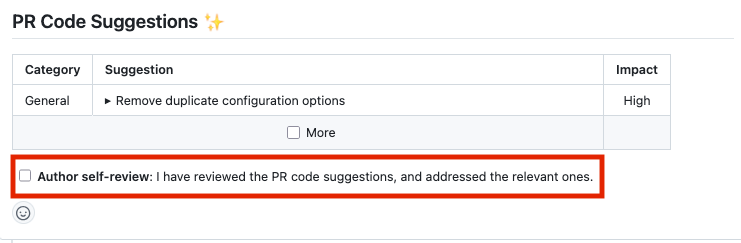
PR-Agent renders the checkbox, but does not react to it being ticked. Nothing is folded, and no approval is added, when the PR author clicks it.
How many code suggestions are generated?
PR-Agent uses a dynamic strategy to generate code suggestions based on the size of the pull request (PR). Here's how it works:
1. Chunking large PRs
- PR-Agent divides large PRs into 'chunks'.
- Each chunk contains up to
config.max_model_tokenstokens (default: 32,000).
2. Generating suggestions
- For each chunk, PR-Agent generates up to
pr_code_suggestions.num_code_suggestions_per_chunksuggestions (default: 3). - To bound output from large or chunked PRs, set
pr_code_suggestions.max_suggestions_per_fileto a positive integer. After all chunks are merged, the highest-scored suggestions are retained per file; ties keep their original order. Summarized output, including unpublished summaries, skips suggestions with unresolvable line locations before applying a positive cap. Inline output keeps its existing selection and fallback behavior. The default value0disables this cap.
This approach has two main benefits:
- Scalability: The number of suggestions scales with the PR size, rather than being fixed.
- Quality: By processing smaller chunks, the AI can maintain higher quality suggestions, as larger contexts tend to decrease AI performance.
Note: Chunking is primarily relevant for large PRs. For most PRs (up to 600 lines of code), PR-Agent will be able to process the entire code in a single call.
While the chunks run, the animated Work in progress ... comment is edited in place with the
number of chunks already analyzed, for example analyzed 2 of 3 chunks, plus ... 1 chunk failed when a chunk gives up. The updates require config.publish_output_progress and a
provider that supports both editing and removing a comment, so single-chunk runs and plain-diff
providers keep the frozen placeholder. Automatic commands publish no progress comment, but while
github.publish_as_check_run is enabled their in-progress check run shows the same chunk count.
A fallback model restores the
placeholder before it starts, and every retry round is added to the total, so the visible count
neither moves backward nor stops early. The comment is then edited into the final suggestions as
usual.
Configuration options
The descriptions below explain each option's behavior. See the relevant sections in
configuration.toml
for the authoritative default values.
General options
| extra_instructions | Optional extra instructions to the tool. For example: "focus on the changes in the file X. Ignore change in ...". |
| suggestions_heading | Visible base heading for summary-table improve comments, without the Markdown prefix.
For example, |
| committable_code_suggestions | If set to true, the tool will display the suggestions as committable code comments. The
deprecated spelling commitable_code_suggestions is still accepted and logs a
warning; it will be removed in 1.0, so rename it. |
| dual_publishing_score_threshold | Minimum score threshold for suggestions to be presented as committable PR comments in addition to the table. |
| focus_only_on_problems | If set to true, suggestions will focus primarily on identifying and fixing code problems, and less on style considerations like best practices, maintainability, or readability. |
| persistent_comment | If set to true, the improve comment will be persistent, meaning that every new improve request will edit the previous one. |
| suggestions_score_threshold | Any suggestion with importance score less than this threshold will be removed. Values above 7-8 may clip relevant suggestions. |
| enable_help_text | If set to true, the tool will display a help text in the comment. |
| enable_chat_text | If set to true, the tool will display a reference to the PR chat in the comment. |
| publish_output_no_suggestions | If set to true, the tool will publish a comment even if no suggestions were found. |
| enable_suggestions_coverage_footer | If set to true, the tool will display a coverage notice when analysis chunks fail or files are omitted by the token budget or maximum number of AI calls. |
Params for number of suggestions and AI calls
| num_code_suggestions_per_chunk | Number of code suggestions provided by the 'improve' tool, per chunk. |
| max_suggestions_per_file | Maximum number of suggestions retained for each file after chunk results are combined. The highest-scored
suggestions are retained. Set to |
| max_number_of_calls | Maximum number of chunks. |
| max_discussion_context_chars | Character budget for the prior code-suggestion threads (and their replies) that 'improve' reads as context
on GitLab and Azure DevOps, so it does not repeat suggestions that were already rejected or addressed.
Default is 24000. Set to |
Recovering a partially failed analysis
A partially failed analysis automatically tries the remaining configured
config.fallback_models for the chunks that raised an exception after other chunks succeeded,
with no extra configuration beyond config.fallback_models itself.
Successful predictions are retained in their original order. Recovery runs model by model,
after the preceding batch finishes, using the matching openai.fallback_deployments where configured,
and follows the effective fallback chain of the invocation, including a primary model selected by
model routing.
A fallback model that recovers at least one chunk is marked as a fallback in the run
details, so the published run line still reports the primary model while the sticky fallback flag
stays set.
Each remaining model is tried at most once per still-failed chunk at the tool level; the model
handler's existing retries and self-reflection calls can add provider requests. A chunk whose complete
generation prompt does not fit a fallback model's token budget is skipped for that model, without
truncating its context; the reserved headroom follows the output allowance the AI handler will
actually request for that model (config.max_output_tokens and related controls), falling back to
the fixed soft threshold when no specific limit is exposed. Later, larger models can still recover
it. Exhausted failures remain in the coverage notice. Cancellation propagates instead of starting
another retry.
This is recovery within one invocation, not persisted resume across commands. Entirely failed initial batches still use the existing whole-batch fallback. Valid empty suggestions are successful results; responses rejected by the existing YAML parser retain its existing parse-failure behavior. An ambiguous repeated model/deployment pair skips partial recovery rather than restarting the chain.
Understanding AI Code Suggestions
- AI Limitations: AI models for code are getting better and better, but they are not flawless. Not all the suggestions will be perfect, and a user should not accept all of them automatically. Critical reading and judgment are required. Mistakes of the AI are rare but can happen, and it is usually quite easy for a human to spot them.
- Purpose of Suggestions:
- Self-reflection: The suggestions aim to enable developers to self-reflect and improve their pull requests. This process can help to identify blind spots, uncover missed edge cases, and enhance code readability and coherency. Even when a specific code suggestion isn't suitable, the underlying issue it highlights often reveals something important that might deserve attention.
- Bug detection: The suggestions also alert on any critical bugs that may have been identified during the analysis. This provides an additional safety net to catch potential issues before they make it into production. It's perfectly acceptable to implement only the suggestions you find valuable for your specific context.
- Hierarchy: Presenting the suggestions in a structured hierarchical table enables the user to quickly understand them, and to decide which ones are relevant and which are not.
- Customization: To guide the model to suggestions that are more relevant to the specific needs of your project, we recommend using the
extra_instructionsandbest practicesfields. - Model Selection: For specific programming languages or use cases, some models may perform better than others.