Similar Issues
Overview
Note:
/similar_issueis an experimental feature. It works only on GitHub, carries a disproportionately large share of the project's dependency and configuration surface for a single-provider tool, and is therefore excluded from the v1 stability guarantees. No backend is tested against its real driver.
The similar issue tool retrieves the most similar issues to the current issue.
It is an issue-scoped command: comment /similar_issue on the issue (served by the GitHub Action; the GitHub App webhook only dispatches comments on pull requests), or run it from the CLI with --issue_url:
/similar_issue
Example usage
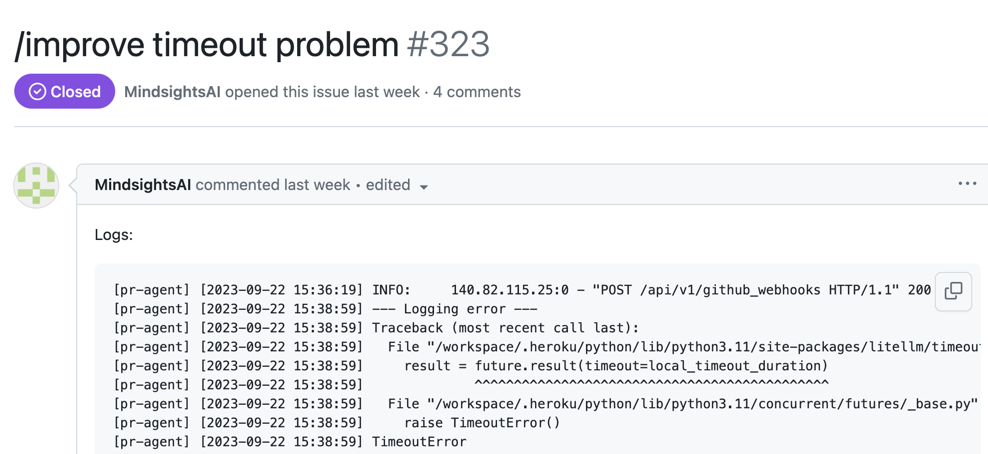

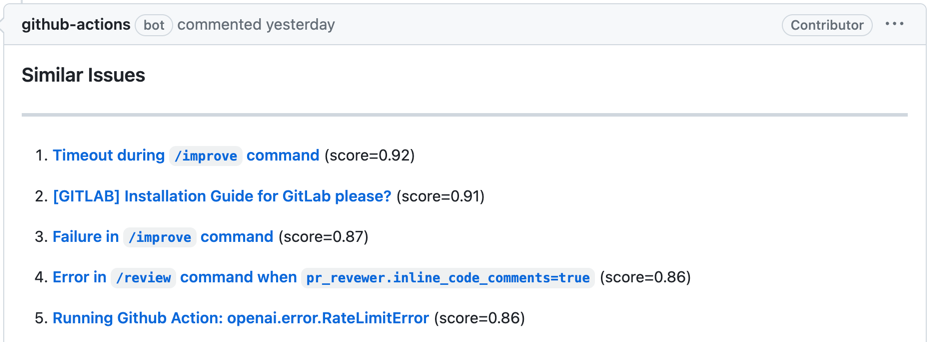
Indexing and re-runs
To perform retrieval, the similar_issue tool indexes the repository's issues in the configured vector database. On every backend:
- The first run indexes up to
max_issues_to_scanissues (default500). - Later runs check the newest
max_issues_to_scanissues and index any that are missing, so previously-indexed issues are not re-embedded. force_update_dataset = truemakes every run re-index the whole repository: LanceDB deletes the repository's rows first, Pinecone and Qdrant upsert over the existing rows.skip_comments = trueskips issue comments and embeds only the issue title and body.
These keys live under the [pr_similar_issue] section. Each backend section below describes its own configuration and re-run behaviour.
Selecting a Vector Database
Configure your preferred database by setting the vectordb parameter under [pr_similar_issue] in configuration.toml:
[pr_similar_issue]
vectordb = "lancedb"  # options: "pinecone", "lancedb", "qdrant"
Available Options
Choose from the following Vector Databases:
- LanceDB
- Pinecone
- Qdrant
LanceDB Configuration
LanceDB is the default backend (vectordb = "lancedb") and needs no external credentials. The index is stored in a local directory given by the [lancedb] uri key (default ./lancedb). A single table (codium-ai-pr-agent-issues) is shared by every repository indexed into the same directory; rows are tagged with the repository name in the metadata.
As described in Indexing and re-runs, the first run creates the table and indexes up to max_issues_to_scan issues; later runs index any missing issue among the newest max_issues_to_scan; force_update_dataset = true deletes the repository's rows and re-indexes them.
Pinecone Configuration
To use Pinecone with the similar issue tool, add these credentials to .secrets.toml (or set as environment variables):
[pinecone]
api_key = "..."
cloud = "aws"
region = "us-east-1"
The cloud value must be one of aws, gcp or azure, and region must be an
availability region offered by that cloud. These parameters can be obtained by
registering to Pinecone. Note that the
tool uses Pinecone's serverless index API; the former environment setting from the
gcp-starter pod tier is no longer supported.
cloud and region are only used when the index does not exist yet and needs to be
created. An existing index is opened by name and is never recreated, so moving an
existing deployment to the new configuration does not lose the stored vectors.
On re-runs, the first run creates the index and upserts up to max_issues_to_scan issues; later runs index any missing issue among the newest max_issues_to_scan; force_update_dataset = true re-indexes the whole repository.
The similar-issue dependency group is not installed in CI, so the pinecone tests run
against a faked module, the qdrant tests never construct a client, and the lancedb tests
run against a fake table.
vectordb defaults to lancedb, which works with no external credentials. To use
qdrant or pinecone, set vectordb = "qdrant" or vectordb = "pinecone" under
[pr_similar_issue].
Qdrant Configuration
To use Qdrant with the similar issue tool, add these credentials to .secrets.toml (or set as environment variables):
[qdrant]
url = "https://YOUR-QDRANT-URL" # e.g., https://xxxxxxxx-xxxxxxxx.eu-central-1-0.aws.cloud.qdrant.io
api_key = "..."
Then select Qdrant in configuration.toml:
[pr_similar_issue]
vectordb = "qdrant"
You can get a free managed Qdrant instance from Qdrant Cloud.
api_key must be present even when the server does not enforce authentication (an empty string is accepted): the tool reads both url and api_key and raises when either is absent. A re-index uploads the whole repository in a single request.
Qdrant points are stored in a collection named codium-ai-pr-agent-issues-v2, derived by appending a -v2 suffix to the shared index name (codium-ai-pr-agent-issues). The suffix is an implementation detail of the Qdrant backend only; pinecone and lancedb use the unsuffixed name.
On re-runs, the first run creates the collection and stores up to max_issues_to_scan issues; later runs index any missing issue among the newest max_issues_to_scan; force_update_dataset = true re-indexes the whole repository.
Earlier versions derived the point id from the issue id alone, so the same issue number collided
across repositories. The id is now seeded with the repository name, which means points written by
an earlier version are never rewritten or deleted - they still carry a matching metadata.repo
payload, so they stay queryable and can surface alongside their replacements.
The -v2 collection suffix sidesteps this: the new index is written to
codium-ai-pr-agent-issues-v2, leaving the pre-existing codium-ai-pr-agent-issues collection
untouched. Nothing is deleted, and the first run after the upgrade re-indexes the repository into
the new collection. Once you are satisfied with the results, you can delete the old
codium-ai-pr-agent-issues collection from Qdrant by hand to reclaim the storage.
How to use
-
Install the tool's extra dependencies (vector databases and datasets), which a bare
uv syncdoes not include:uv sync --group similar-issue -
To invoke the 'similar issue' tool from CLI, run:
uv run pr-agent --issue_url=... similar_issue -
To invoke the 'similar' issue tool via online usage, comment on an issue:
/similar_issue -
You can also enable the 'similar issue' tool to run automatically when a new issue is opened, by adding it to the pr_commands list in the github_app section