Review
Overview
Generate a PR review with feedback on possible issues, security concerns, tests and review effort.
The tool can be triggered automatically every time a new PR is opened, or can be invoked manually by commenting on any PR:
/review
Note that the main purpose of the review tool is to provide the PR reviewer with useful feedback and insights. The PR author, in contrast, may prefer to save time and focus on the output of the improve tool, which provides actionable code suggestions.
(Read more about the different personas in the PR process and how PR-Agent aims to assist them in our blog)
Example usage
Manual triggering
Invoke the tool manually by commenting /review on any PR:

After ~30 seconds, the tool will generate a review for the PR:
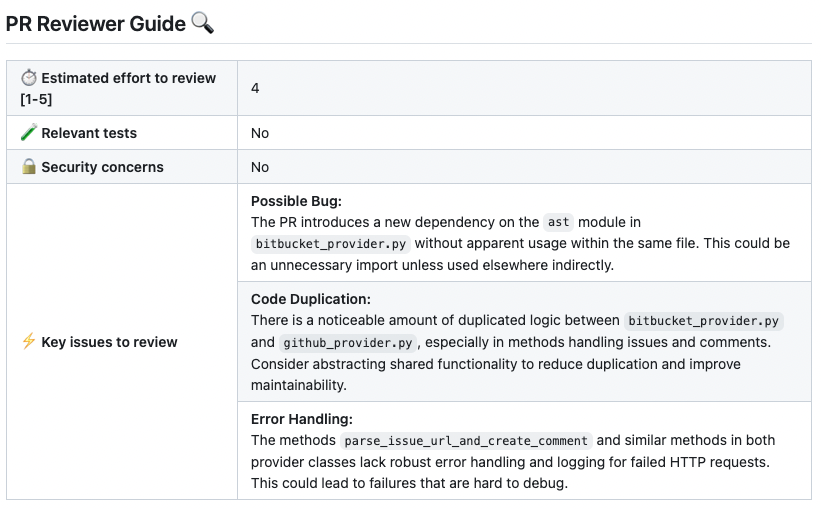
If you want to edit configurations, add the relevant ones to the command:
/review --pr_reviewer.some_config1=... --pr_reviewer.some_config2=...
From the CLI, save the parsed review and token usage as JSON for a later CI step:
pr-agent --pr_url https://github.com/org/repo/pull/123 --json-output review.json review
The JSON file is written after the review completes. Place --json-output before review or review_pr.
Automatic triggering
To run the review automatically when a PR is opened, define in a configuration file:
[github_app]
pr_commands = [
    "/review",
    ...
]

[pr_reviewer]
extra_instructions = "..."
...
- The
pr_commandslists commands that will be executed automatically when a PR is opened. - The
[pr_reviewer]section contains the configurations for thereviewtool you want to edit (if any).
Configuration options
The descriptions below explain each option's behavior. See the relevant sections in
configuration.toml
for the authoritative default values.
General options
| persistent_comment | If set to true, the review comment will be persistent, meaning that every new review request will edit the previous one. |
| publish_review_failure_comment | Set to false to suppress the "Failed to review PR" comment, including when a persistent review comment cannot be updated. Successful review output and the command's failure status are unchanged. Default is true. |
| publish_error_details | If set to true, a failed manual review comment includes a deterministic, sanitized failure reason for known provider and runtime errors. The failure formatter does not call an AI model, never publishes raw exception text, and falls back to a generic internal-error message. Default is false. |
| review_heading |
Visible base heading for review comments, without the Markdown prefix or incremental label.
For example, review_heading = "Guideline Compliance Check" renders
## Guideline Compliance Check 🔍 for a full review and
## Incremental Guideline Compliance Check 🔍 for an incremental review.
On GitHub, GitLab, Azure DevOps, and Bitbucket Cloud, changing this value updates the same
persistent review comment; it does not create a separate review channel.
|
| persistent_finding_state | If set to true, PR-Agent persists structured review finding state across complete review runs, so findings can be resolved and reopened. Resolved findings retain the original Markdown formatting of their description. Incremental and partial reviews do not resolve absent findings. Default is true. |
| max_previous_findings_chars | Character budget for the findings stored by earlier reviews (requires persistent_finding_state). They are given to the model so it repeats a still-valid finding with its earlier wording instead of re-raising it reworded, and does not re-raise a resolved one unless the code reintroduces it. On GitHub and GitLab, an inline key-issue thread that someone other than PR-Agent resolved is given as dismissed, with its last reply, so the model does not re-raise it unless the code makes it worse. Set to 0 to disable. Default is 8000.
On Azure DevOps, verified PR-Agent inline key issues with wontFix or byDesign
are also passed as dismissed when the status differs from azure_devops.default_comment_status.
A matching default stays an ordinary prior finding. This infers a human decision; Azure does not identify
the status-changing actor here, and the current default may differ from the default used at creation.
Stable azure_devops_server.agent_identity configuration is required.
|
| final_update_message | When set to true, updating a persistent review comment during online commenting will automatically add a short comment with a link to the updated review in the pull request. |
| extra_instructions | Optional extra instructions to the tool. For example: "focus on the changes in the file X. Ignore change in ...". |
| enable_help_text | If set to true, the tool will display a help text in the comment. |
| enable_review_coverage_footer | If set to true, the tool will display a review coverage footer when the token budget leaves files out of the review. |
| enable_large_pr_chunking | If set to true, and the token budget leaves files out of the review, the diff is split into chunks, each chunk is reviewed separately, and the per-chunk results are merged into one review. See Reviewing a PR that does not fit in one call. Default is false. |
| max_number_of_calls | Maximum number of chunk review calls, used only when enable_large_pr_chunking is true. Default is 3. |
| num_max_findings | Maximum number of returned findings. |
| inline_key_issues | If set to true, each key issue is published as an inline comment where the provider supports verified inline-comment publication (GitHub, Bitbucket Cloud, Azure DevOps, GitLab). A finding leaves the review summary when a matching comment exists or the provider accepts the new comment. Findings that cannot be anchored or published stay in the summary. |
Enable\disable specific sub-sections
| require_score_review | If set to true, the tool will add a section that scores the PR. |
| require_tests_review | If set to true, the tool will add a section that checks if the PR contains tests. |
| require_estimate_effort_to_review | If set to true, the tool will add a section that estimates the effort needed to review the PR. |
| require_estimate_contribution_time_cost | If set to true, the tool will add a section that estimates the time required for a senior developer to create and submit such changes. |
| require_can_be_split_review | If set to true, the tool will add a section that checks if the PR contains several themes, and can be split into smaller PRs. |
| require_security_review | If set to true, the tool will add a section that checks if the PR contains a possible security or vulnerability issue. |
| require_todo_scan | If set to true, the tool will add a section that lists TODO comments found in the PR code changes. |
| require_ticket_analysis_review | If set to true and ticket context is available, the tool adds a ticket-compliance section to the review comment that checks whether the PR fulfills the ticket requirements. Supported sources include GitHub and GitLab issues, linked Azure DevOps work items, Jira Cloud tickets, and Asana tasks. |
| require_risk_assessment | If set to true, the tool will add a section that rates the overall risk of the PR as low, medium or high. |
| require_merge_recommendation | If set to true, the tool will add a section describing what the review found: no_concerns_found (no important blockers or risks identified), needs_review (seems acceptable but deserves focused reviewer attention) or changes_required (clear issues to fix before merge). The value reports the model's findings, not a guarantee about the code. |
| require_failure_modes | Off by default. If enabled, adds up to three concrete failure scenarios, each with what could break, where, its trigger, how it could be detected, and whether a test or check in this PR covers it. These scenarios guide human review; they do not gate merging or prove that the PR is safe. |
| require_priority_files | If set to true, the tool will add a section listing the files a human reviewer should inspect first. |
Adding PR labels
You can enable\disable the review tool to add specific labels to the PR:
| enable_review_labels_security | If set to true, the tool will publish a 'possible security issue' label if it detects a security issue. |
| enable_review_labels_effort | If set to true, the tool will publish a 'Review effort x/5' label (1–5 scale). |
Usage Tips
General guidelines
The review tool provides a collection of configurable feedbacks about a PR.
It is recommended to review the Configuration options section, and choose the relevant options for your use case.
Some of the features that are disabled by default are quite useful, and should be considered for enabling. For example:
require_score_review, and more.
On the other hand, if you find one of the enabled features to be irrelevant for your use case, disable it. No default configuration can fit all use cases.
Automation
When you first install PR-Agent app, the default mode for the review tool is:
pr_commands = ["/review", ...]
Meaning the review tool will run automatically on every PR, without any additional configurations.
Edit this field to enable/disable the tool, or to change the configurations used.
Auto-generated PR labels by the Review Tool
The review tool can automatically add labels to your Pull Requests:
possible security issue: This label is applied if the tool detects a potential security vulnerability in the PR's code. This feedback is controlled by the 'enable_review_labels_security' flag (default is true).review effort [x/5]: This label estimates the effort required to review the PR on a relative scale of 1 to 5, where 'x' represents the assessed effort. This feedback is controlled by the 'enable_review_labels_effort' flag (default is true).
Ticket compliance is reported in the review comment, not as a PR label. It is controlled by
pr_reviewer.require_ticket_analysis_review and requires available ticket context. The tool does not add
ticket-compliance labels or a "No ticket found" label. See
Fetching ticket context for linking and authentication details.
Auto-blocking PRs from being merged based on the generated labels
You can configure a CI/CD Action to prevent merging PRs with specific labels. For example, implement a dedicated GitHub Action.
This approach helps ensure PRs with potential security issues will not be merged without further review.
Since AI may make mistakes or lack complete context, use this feature judiciously. For flexibility, users with appropriate permissions can remove generated labels when necessary. When a label is removed, this action will be automatically documented in the PR discussion, clearly indicating it was a deliberate override by an authorized user to allow the merge.
Extra instructions
Extra instructions are important.
The review tool can be configured with extra instructions, which can be used to guide the model to a feedback tailored to the needs of your project.
Be specific, clear, and concise in the instructions. With extra instructions, you are the prompter. Specify the relevant sub-tool, and the relevant aspects of the PR that you want to emphasize.
Examples of extra instructions:
[pr_reviewer]
extra_instructions="""\
In the code feedback section, emphasize the following:
- Does the code logic cover relevant edge cases?
- Is the code logic clear and easy to understand?
- Is the code logic efficient?
...
"""
Use triple quotes to write multi-line instructions. Use bullet points to make the instructions more readable.
Reviewing a PR that does not fit in one call
When a PR diff is larger than the model's token budget, the review tool drops whole files
until the diff fits, and lists the dropped files in the review coverage footer.
Setting enable_large_pr_chunking = true changes what happens next: the diff is split into up
to max_number_of_calls chunks, each chunk is reviewed on its own, and the answers are merged
into a single review that says how many chunks it was built from. Files that do not fit even
after chunking are still listed in the coverage footer. Every chunk is a separate model call,
so a chunked review costs roughly max_number_of_calls times a normal one.
While the chunks run, the temporary Preparing review... comment is rewritten in place with the
number of chunks already analyzed, for example Preparing review... analyzed 2 of 3 chunks, plus
... 1 chunk failed when a chunk gives up. The updates require
config.publish_output_progress and a provider that supports both editing and removing a
comment, so plain-diff runs keep the frozen placeholder. Automatic commands publish no progress
comment, but while github.publish_as_check_run is enabled their in-progress check run shows the
same chunk count. The comment stays
temporary and is still removed before the merged review is published. A fallback model restores
the placeholder before it starts, so the visible count never moves backward.
If a chunk fails or returns malformed output, successful chunks are retained and fallback models retry only the pending work. Pending chunks can be split for a smaller model, within the call limit; a larger model can also include previously omitted files. Chunks that still exceed the model's budget are not sent to it.
If every fallback is exhausted, successful chunks are published as a partial review with a
failed-chunk coverage warning, even when publish_output_no_suggestions = false. Incomplete
reviews cannot resolve absent persistent findings. If no chunk succeeds, the review fails.
With config.propagate_tool_errors = true, an exhausted fallback chain still signals failure
to the caller after publishing the partial review and removing the progress comment.
Optional run details list all models that contributed to the merged review.
Each chunk answers the same questions about a different part of the PR, so the answers are merged field by field:
| Field | Merge rule |
|---|---|
key_issues_to_review | Union over the chunks, dropping findings that repeat the same file, header and text |
security_concerns | Every chunk that reported a concern is kept; "No" only when every chunk said no |
todo_sections, review_priority_files, can_be_split | Union, de-duplicated, in chunk order (can_be_split keeps at most 3 sub-PRs) |
relevant_tests | Yes if any chunk found tests |
score | The lowest score any chunk gave |
risk_level, merge_recommendation | The most conservative value any chunk gave |
failure_modes | Concatenate valid cases in chunk order, keeping at most three |
estimated_effort_to_review_[1-5] | The highest value any chunk gave |
contribution_time_cost_estimate | The sum over the chunks, per case |
ticket_compliance_check | One entry per ticket, with its bullet lists unioned across chunks |
The merged verdict is deliberately never less alarming than the worst chunk: a clean chunk cannot raise a score, clear a security concern, or soften a risk level set by another chunk.