Additional Configurations
Show possible configurations
The possible configurations of PR-Agent are stored in here. In the tools page you can find explanations on how to use these configurations for each tool.
To print all the available configurations as a comment on your PR, you can use the following command:
/config
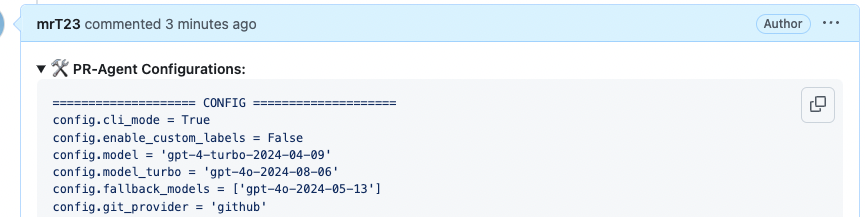
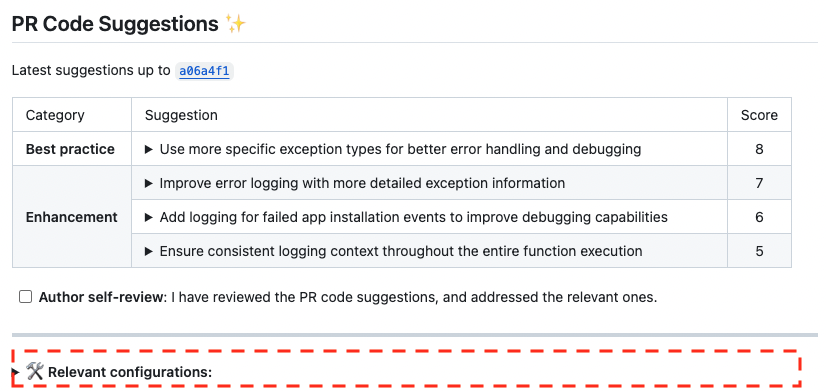
To view the actual configurations used for a specific tool after all user settings are applied,
an authorized operator can set config.output_relevant_configurations=true in .pr_agent.toml.
Comment-supplied arguments cannot enable this output because it may disclose host-controlled settings.
Showing the agent run details
To see which model actually answered, how many tokens the run consumed, and how long the AI processing phase took, enable config.output_run_details:
/review --config.output_run_details=true
API-cost collection is a separate, default-off option controlled by config.output_run_cost. Enable both flags to collect it and add it inside the run-details section:
/review --config.output_run_details=true --config.output_run_cost=true
config.output_run_details remains the public-output gate: setting only config.output_run_cost=true collects run-level cost data but never adds it to a PR comment.
On providers that support GitHub-Flavored Markdown this appends a collapsible section to the generated comment; elsewhere /review and /describe append the same information as plain text:
⚙️ Agent run details
- Model: provider/fallback-model (fallback)
- Tokens: 12,340 in / 1,205 out / 13,545 total
- Time cost: 8.2s
- AI calls: 1
- Estimated API cost: $0.08 USD
  - anthropic/claude-opus-5: $0.07 USD
  - anthropic/claude-sonnet-5: $0.01 USD
Model shows the model that produced the answer, marked (fallback) when the primary model failed and a fallback took over. The Tokens line appears only when the model provider reports usage. AI calls counts the successful LLM invocations made during the run. The flag is disabled by default.
Estimated API cost is derived synchronously from each completed LiteLLM response and its finalized usage. LiteLLM can account for cache reads, cache writes, reasoning tokens, and provider-specific usage categories when the response and its pricing data include them. Multi-model runs show a compact breakdown of the known costs. Exact Decimal values are retained for aggregation, while public currency output is rounded to two decimal places; a tiny positive value that would round to zero is shown as <$0.01 instead of $0.00. If only some successful calls can be priced, the total is marked partial with the priced-call count; if none can be priced, the line reports unavailable. Missing pricing is never rendered as $0.
The amount is an estimate based on LiteLLM's pricing data, not provider-invoice-authoritative billing. Reconcile it with the provider's billing records before using it for accounting or chargeback. Streaming responses are priced only after finalized usage is available; asynchronous callbacks and transient response_cost callback metadata are not treated as the sole source of truth. The public section contains only aggregate costs and configured model names, never prompts, response bodies, API keys, or provider request IDs.
Notes:
/improveappends the section only when it publishes a summary comment. If the provider lacks GFM support orpr_code_suggestions.committable_code_suggestionsis enabled,/improveposts inline comments instead, so no run details section appears.- With
pr_description.use_description_markers=true, repeated/describeruns accumulate one run details block per run because the existing PR description is preserved and only the markers are replaced.
Ignoring files from analysis
In some cases, you may want to exclude specific files or directories from the analysis performed by PR-Agent. This can be useful, for example, when you have files that are generated automatically or files that shouldn't be reviewed, like vendor code.
You can ignore files or folders using the following methods:
IGNORE.GLOBIGNORE.REGEX
which you can edit to ignore files or folders based on glob or regex patterns.
Example usage
Let's look at an example where we want to ignore all files with .py extension from the analysis.
To ignore Python files in a PR with online usage, comment on a PR:
/review --ignore.glob="['*.py']"
To ignore Python files in all PRs using glob pattern, set in a configuration file:
[ignore]
glob = ['*.py']
And to ignore Python files in all PRs using regex pattern, set in a configuration file:
[ignore]
regex = ['.*\.py$']
A **/ segment in a glob pattern matches zero or more directories, so src/**/generated_*.py also ignores src/generated_pb.py and not only src/api/generated_pb.py. Note that * still matches across /, as in ['*.py'] above.
Each ignore-glob list keeps at most 256 additional, distinct zero-directory regexes. Patterns with more than six standalone **/ segments or more than 256 characters are not expanded. Configured patterns and the existing root-level form of a leading **/ are always kept and do not count toward the limit. Skipped variants are reported once per list; files only those variants match are still analyzed.
The limit applies separately to ignore.glob and each enabled ignore_language_framework list. Globs made entirely of stars and separators, such as **/**/**, can match every file after zero-directory expansion.
Extra instructions
All PR-Agent tools have a parameter called extra_instructions, that enables to add free-text extra instructions. Example usage:
/update_changelog --pr_update_changelog.extra_instructions="Make sure to update also the version ..."
Language Settings
The default response language for PR-Agent is U.S. English. However, some development teams may prefer to display information in a different language. For example, your team's workflow might improve if PR descriptions and code suggestions are set to your country's native language.
To configure this, set the response_language parameter in the configuration file. This will prompt the model to respond in the specified language. Use a standard locale code based on ISO 3166 (country codes) and ISO 639 (language codes) to define a language-country pair. See this comprehensive list of locale codes.
Example:
[config]
response_language = "it-IT"
This will set the response language globally for all the commands to Italian.
Important: Note that only dynamic text generated by the AI model is translated to the configured language. Static text such as labels and table headers that are not part of the AI models response will remain in US English. In addition, the model you are using must have good support for the specified language.
Expand GitLab submodule diffs
By default, GitLab merge requests show submodule updates as Subproject commit lines. To include the actual file-level changes from those submodules in PR-Agent analysis, enable:
[gitlab]
expand_submodule_diffs = true
When enabled, PR-Agent will fetch and attach diffs from the submodule repositories. The default is false to avoid extra GitLab API calls.
Submodule URLs in .gitmodules may be absolute (https://, ssh://, git@host:) or relative (../group/repo.git). Relative URLs are resolved against the merge request's project path the same way git does.
Because .gitmodules comes from the merge request head, the target project is chosen by whoever opened it. PR-Agent therefore authorizes each submodule target the same way it authorizes a sibling repository: the target must be listed in config.repo_context_sibling_repos, must sit in the merge request project's own top-level namespace, and must be readable by the user who triggered the command. Targets that fail any of these checks are skipped with a warning and the parent gitlink change is left in place. Add each submodule you want expanded to the allowlist:
[config]
repo_context_sibling_repos = ["my-group/my-submodule"]
Post the review as a GitLab thread
By default, PR-Agent posts the /review summary as a plain note. To post it as a resolvable thread (GitLab discussion) instead, enable (default: false):
[gitlab]
publish_review_as_thread = true
- With
pr_reviewer.persistent_comment=true(the default), each run updates the existing review thread and reopens it if it was resolved, so the refreshed review gets another look. - Enabling the flag does not convert a review that was already posted as a plain note: it keeps being updated in place, and GitLab cannot promote a note to a thread. Only MRs whose first review runs after the flag is set get a thread.
- Set
pr_reviewer.persistent_comment=falseto open a new review thread on each run instead.
Reply to the triggering GitLab discussion
By default, /review and /improve publish a new comment. To reply inside the GitLab discussion that triggered the command, enable (default: false):
[gitlab]
reply_to_trigger_comment = true
This is opt-in and GitLab-only. The webhook supplies the discussion ID for top-level /review and /improve notes. If the ID is unavailable or the reply fails, PR-Agent falls back to a normal note so output is not lost. GitHub Conversation comments do not expose a compatible reply endpoint.
With persistent_comment=true (the default for both tools), a rerun updates the earlier result where it was first posted, which may be a different discussion; /review also posts a short link to it in the new command's discussion.
Post the /improve suggestions as a GitLab thread
By default, PR-Agent posts the /improve suggestions as a plain note. To post them as a resolvable thread (GitLab discussion) instead, enable (default: false):
[gitlab]
publish_improve_as_thread = true
- A run that finds no suggestions edits the thread in place and resolves it, so a status message does not leave an open thread behind.
Resolve outdated GitLab inline threads
Each inline suggestion is anchored to the MR head commit it was posted against. When a later push moves the head, GitLab marks that thread as belonging to an outdated diff version: it renders empty, loses its Resolve control, and can then only be closed through the API, so superseded suggestions pile up on a long-lived MR. To have PR-Agent resolve those threads before it publishes a fresh batch of inline suggestions, enable (default: false):
[gitlab]
resolve_outdated_inline_threads = true
A thread is only resolved when all of the following hold, so a thread with any human reply is never closed:
- the thread was opened by PR-Agent itself, judged from the body: it carries a dedup marker (proof, and present on every inline review finding), or it opens with the
**Suggestion:**lead that inline suggestions are published with (a strong hint rather than proof, since a person could type it). This is what keeps the cleanup off hand-written comments made from the same account, which matters because the GitLab token often belongs to a person rather than a dedicated bot user; - every non-system note in it was written by that same user, so a single human reply leaves the thread alone. GitLab system notes are ignored, because the "changed this line in version N of the diff" note that marks a thread outdated is authored by whoever pushed;
- the thread is unresolved and anchored to a line of the diff;
- the head SHA recorded in that anchor differs from the MR's current diff head SHA.
Anything that cannot be confirmed (an unreadable position, an unknown current head SHA, an unresolvable bot identity) is skipped rather than resolved.
Note that the anchor's recorded head SHA never changes after the thread is created, so any PR-Agent thread older than the latest push qualifies, including ones GitLab still renders on unchanged lines. With config.persistent_inline_comments enabled the next run re-posts a suggestion that still applies, so the effect is resolve-and-repost rather than removal.
Log Level
PR-Agent allows you to control the verbosity of logging by using the log_level configuration parameter. This is particularly useful for troubleshooting and debugging issues with your PR workflows.
[config]
log_level = "DEBUG"  # Options: "DEBUG", "INFO", "WARNING", "ERROR", "CRITICAL"
The default log level is "DEBUG", which provides detailed output of all operations. If you prefer less verbose logs, you can set higher log levels like "INFO" or "WARNING".
Attributing requests to a PR on the provider side
When add_user_to_requests is enabled, PR-Agent sends the current command and PR URL in the
OpenAI-compatible user request field, as a compact JSON string:
{"command":"improve","pr_url":"https://gitlab.example.com/group/project/-/merge_requests/171"}
Providers that record this field per request (for example OpenRouter, which shows it as
external_user in the generation details and includes it in the activity export) can then
attribute every request, its cost and its outcome to a specific PR and command, without
timestamp correlation.
[config]
add_user_to_requests = true
The setting is disabled by default, since it shares request-attribution data with the model provider: enabling it is an explicit operator choice.
Integrating with Logging Observability Platforms
Various logging observability tools can be used out-of-the box when using the default LiteLLM AI Handler. Simply configure the LiteLLM callback settings in configuration.toml and set environment variables according to the LiteLLM documentation.
For example, to use LangSmith you can add the following to your configuration.toml file:
[litellm]
enable_callbacks = true
success_callback = ["langsmith"]
failure_callback = ["langsmith"]
service_callback = []
Then set the following environment variables:
LANGSMITH_API_KEY=<api_key>
LANGSMITH_PROJECT=<project>
LANGSMITH_BASE_URL=<url>
To use Langfuse for utilization and adoption tracking (LLM cost, token usage, latency, and unique repo adoption), add the following to your configuration:
[litellm]
enable_callbacks = true
success_callback = ["langfuse_otel"]
failure_callback = ["langfuse_otel"]
Note: use
langfuse_otel(the OpenTelemetry-based integration), not the legacylangfusecallback — the legacy callback is incompatible with the Langfuse 3.x SDK this project pins.
Then set the following environment variables:
LANGFUSE_HOST=https://cloud.langfuse.com
LANGFUSE_PUBLIC_KEY=<public_key>
LANGFUSE_SECRET_KEY=<secret_key>
Each LLM call is traced with the command name, git provider, PR URL, model, token counts, and version as tags — giving you full visibility into how pr-agent is being used across your repositories.
LLM telemetry via LiteLLM's OpenTelemetry integration
To emit OpenTelemetry traces and metrics for the LLM calls themselves — cost in USD, call duration, time to first token, and the input/output token split, on standard gen_ai.* semantic-convention names — enable LiteLLM's built-in otel callback:
[litellm]
success_callback = ["otel"]
failure_callback = ["otel"]
turn_off_message_logging = true
Set
turn_off_message_logging = true. LiteLLM attaches full prompt and response content to what its callbacks emit, which here means the entire PR diff. The default isfalseto preserve existing behavior for Langfuse and LangSmith users.
The integration is configured through environment variables:
OTEL_EXPORTER=otlp_http            # or "console", "otlp_grpc"
OTEL_EXPORTER_OTLP_ENDPOINT=https://collector:4318
OTEL_EXPORTER_OTLP_HEADERS=...
OTEL_SERVICE_NAME=pr-agent
LITELLM_OTEL_INTEGRATION_ENABLE_METRICS=true   # metrics are off by default
Pending callbacks are flushed before the CLI and the GitHub Action runner exit, bounded by callback_timeout_seconds (see Custom callbacks).
Custom callbacks
If you embed PR-Agent in your own code, you can also register callbacks programmatically — for example a
litellm.CustomLogger that records per-call token usage and cost:
import litellm
from pr_agent import cli

class UsageLogger(litellm.integrations.custom_logger.CustomLogger):
    async def async_log_success_event(self, kwargs, response_obj, start_time, end_time):
        record_usage(kwargs.get("model"), response_obj)

litellm.callbacks = [UsageLogger()]
cli.run_command("<pr_url>", "/review")
LiteLLM dispatches these callbacks asynchronously, after the completion call has already returned. PR-Agent
flushes any pending callbacks before the CLI (and the GitHub Action runner) exits, so they are not lost when
the event loop is torn down — no configuration required. Use callback_timeout_seconds to bound how long
that flush may take:
[litellm]
callback_timeout_seconds = 30 # default
Built-in OpenTelemetry command telemetry
PR-Agent can emit its own OpenTelemetry signals for utilization and adoption tracking. These cover the command layer — how often each tool runs, on which git provider, whether it succeeded, and how many tokens it consumes — which no LLM-level integration can report, because many failures happen before any model call:
- Traces: one span per request, named
pr_agent <command>(for examplepr_agent review), carryingpr_agent.command,pr_agent.args_count,vcs.provider.name, a span status, and a boundederror.typeon failure. Prompt and response content is never attached. - Metrics:
pr_agent.commands, a counter of executed commands labeled by command and git provider.pr_agent.tokenscounts consumed tokens, labeled by command, git provider,pr_agent.fallback_used(true or false), andgen_ai.token.type(input,output,cache_read, orcache_creation).pr_agent.ai_callscounts successful model calls, labeled by command, git provider, andpr_agent.fallback_used. Zero values are skipped, so providers that do not report usage add no token timeseries (pr_agent.ai_callsstill counts their calls).
Two independent layers
Command telemetry (this section) and LLM telemetry are separate toggles with separate configuration, so you can enable either alone and aggregate them independently. When both are on, the LLM spans are children of the command span in the same trace, so a single command's model calls stay attributable to it.
Telemetry is disabled by default. To enable it, set in configuration.toml:
[otel]
is_enabled = true
exporter_type = "console" # "console", "otlp", "prometheus", or "none"
service_name = "pr-agent"
environment = "development" # e.g. "development", "staging", "production"
To export to an OpenTelemetry collector instead of the console, set exporter_type = "otlp" and configure the endpoint and any authentication headers in .secrets.toml (they are secrets — keep them out of configuration.toml):
[otel]
otlp_endpoint = "http://my-collector:4318"
otlp_headers = "x-honeycomb-team=YOUR_API_KEY" # optional, "key1=value1,key2=value2"
Export uses OTLP over HTTP by default; otlp_endpoint is the base URL, and the /v1/traces and /v1/metrics paths are appended automatically. To use OTLP over gRPC instead, install the optional exporter and select the protocol — the endpoint is then used as-is (gRPC collectors typically listen on port 4317):
pip install pr-agent[otel-grpc]
[otel]
otlp_protocol = "grpc" # default: "http"
This is the recommended topology for fleets: point every PR-Agent instance at the same collector and aggregate there. Each process creates its own exporter connection; use the service_name and environment resource attributes to slice instances apart on the backend.
Exposing native Prometheus metrics
Instead of pushing to a collector, set exporter_type = "prometheus" to expose a native GET /metrics scrape endpoint on the gunicorn-served apps (github_app, gitlab_webhook, azuredevops_server_webhook, gitea_app). The command, token, and AI-call counters are translated into the Prometheus text format, and every gunicorn worker's values are merged at scrape time, so counters stay correct across the process workers:
[otel]
exporter_type = "prometheus"
prometheus_multiproc_dir = "/tmp/pr-agent-prometheus" # shared, writable by every worker
- The exporter is metrics-only: command spans are not exported in this mode.
/metricsis mounted only when this exporter is selected, so nothing is exposed by default. It does not depend on an OTLP collector or endpoint.- gunicorn registers and deregisters workers' state files automatically (
when_ready/child_exit); a worker that dies mid-scrape leaves only a stale file, which is ignored once it is marked dead. - Metric families are created from the first data point's label set. Later attributes that do not fit the family are dropped, and missing ones are back-filled with an empty string, so a scrape never breaks on drifting label cardinality.
- The exporter ships with PR-Agent (it depends on
prometheus-client); no extra package is required. Scrape it like any exporter:
scrape_configs:
  - job_name: pr-agent
    static_configs:
      - targets: ["pr-agent:3000"]
Privacy controls (both off by default):
include_pr_url = trueattaches PR URLs to spans. Off by default because URLs expose private repo names.include_error_details = trueattaches exception messages and rejected-command text to error spans. Off by default because that content can embed PR URLs, repo names, or other request-specific text. Bounded values (the exception class name and error category) are always attached.
Notes:
- Telemetry configuration is process-level: it is read once at startup from the global configuration or environment, and cannot be enabled or reconfigured per-repo via
.pr_agent.toml. In a multi-tenant server, telemetry is a shared process resource — configure it where the process is deployed. - PR-Agent keeps its own OpenTelemetry providers and never registers the process-global one, so embedding PR-Agent in an application that already uses OpenTelemetry will not interfere with the host's telemetry. Pending spans and metrics are flushed automatically on process exit.
- Each OTLP export call is bounded by
otlp_timeout(default 3 seconds, retries included), so an unreachable collector cannot hang CLI exit or request completion. Raise it for slow collectors at the cost of longer worst-case stalls. - If
exporter_type = "otlp"is set but no endpoint is configured, telemetry is disabled entirely (fail closed) — it never falls back to another exporter, so a missing secret cannot redirect telemetry into process logs. - With
exporter_type = "prometheus",prometheus_multiproc_dirmust be a shared directory writable by every worker; it defaults to/tmp/pr-agent-prometheus. In non-gunicorn (single-process) deployments the exporter works without it and simply serves the process's own registry. - Serverless deployments (e.g. the AWS Lambda webhooks) are supported: buffered spans and metrics are force-flushed at the end of every handled request, because frozen execution environments stop background export threads and are reaped without running exit handlers. No extra configuration is needed.
Bringing per-repo context files to PR-Agent
Platforms supported: GitHub, GitLab, Gitea, Bitbucket, Azure DevOps, Local
To give PR-Agent's tools additional project context, you can have it include repository instruction files — such as AGENTS.md or CLAUDE.md — in the prompts for the /review, /describe and /improve tools.
By default, PR-Agent looks for an AGENTS.md file at the repository root:
[config]
repo_context_files = ["AGENTS.md"]
You can list any repository-relative paths. By default the files are read from the repository's default branch, so only trusted, already-merged content is used and a PR cannot influence the guidance used to review it. A file that is missing is silently skipped. Set the option to an empty list to disable the feature entirely:
[config]
repo_context_files = ["AGENTS.md", "CLAUDE.md", "docs/conventions.md"]
By default (repo_context_from_default_branch = true), instruction files are read from the repository's default branch — a single trusted source — so neither the PR nor its target branch can alter the guidance used to review it. This matches how Qodo Merge reads these files.
Set repo_context_from_default_branch = false to instead read from the PR's target (base) branch. This respects branch-specific instructions (for example a release branch, or a stacked PR that carries its own AGENTS.md), at the cost of trusting whoever can write to that target branch. Even then, files are never read from the PR's own head.
The local git provider has no separate default branch, so it always reads instruction files from the committed target branch (the branch passed as --pr_url), never from HEAD or uncommitted changes.
[config]
repo_context_from_default_branch = false
To bound how much of this context is sent to the model, repo_context_max_lines (default 500) caps the total number of rendered lines, including the wrapper tags. Content beyond the budget is truncated safely:
[config]
repo_context_max_lines = 500
Context from sibling repositories
The host operator must first approve repositories in the deployment configuration:
[config]
repo_context_sibling_repos = ["my-group/library"]
repo_context_max_sibling_files = 5
Approve only repositories whose contents may appear in reviews of consuming repositories. This allowlist and the fetch limit cannot be changed by repository settings or comment arguments. An empty allowlist disables sibling reads.
A consuming repository can then select files in its .pr_agent.toml as structured
repo_context_files entries:
[config]
repo_context_files = [
    "AGENTS.md",
    {repo_id = "my-group/library", file_path = "src/api.py"},
]
Use owner/repository on GitHub or a full project path on GitLab. GitLab also accepts numeric
project IDs as strings, provided the same identifier is in the host allowlist. Resolved repositories
must share the current repository's owning namespace: the GitHub owner or GitLab top-level group,
including projects in different subgroups. Renamed or redirected paths must be updated to their
canonical names in both settings.
Sibling files always come from their default branch and share repo_context_max_lines with local
files. Private and internal repositories also require requester access. Comment arguments cannot
override repo_context_files at all; a repository's .pr_agent.toml may still set it.
Ignoring automatic commands in PRs
PR-Agent allows you to automatically ignore certain PRs based on various criteria:
- PRs with specific titles (using regex matching)
- PRs between specific branches (using regex matching)
- PRs from specific repositories (using regex matching)
- PRs not from specific folders
- PRs containing specific labels
- PRs opened by specific users
The title, author, label, repository, source-branch, and target-branch ignore_* rules also apply to
comment commands such as /review and /ask, and to CLI --pr_url runs. In these paths,
ignore_pr_authors matches the PR author, not the person posting the command. An ignored CLI
request exits successfully without running the tool. Plain-diff CLI inputs (--diff-file and
--stdin) have no PR metadata and are not excluded by these rules.
Ignoring PRs with specific titles
To ignore PRs with a specific title such as "[Bump]: ...", you can add the following to your configuration.toml file:
[config]
ignore_pr_title = ["\\[Bump\\]"]
Where the ignore_pr_title is a list of regex patterns to match the PR title you want to ignore. Default is ignore_pr_title = ["^\\[Auto\\]", "^Auto"].
The default ^Auto pattern also matches ordinary titles such as "Autoscaling fix". Because title
rules now apply to manual commands too, /review, /ask, and CLI --pr_url commands on such PRs
are skipped. Set a narrower ignore_pr_title pattern or use ignore_pr_title = [] in your
configuration if that is not intended. A skipped request is logged without running the tool or
posting command reactions.
Ignoring PRs between specific branches
To ignore PRs from specific source or target branches, you can add the following to your configuration.toml file:
[config]
ignore_pr_source_branches = ['develop', 'main', 'master', 'stage']
ignore_pr_target_branches = ["qa"]
Where the ignore_pr_source_branches and ignore_pr_target_branches are lists of regex patterns to match the source and target branches you want to ignore.
They are not mutually exclusive, you can use them together or separately.
Ignoring PRs from specific repositories
To ignore PRs from specific repositories, you can add the following to your configuration.toml file:
[config]
ignore_repositories = ["my-org/my-repo1", "my-org/my-repo2"]
Where the ignore_repositories is a list of regex patterns to match the repositories you want to ignore. This is useful when you have multiple repositories and want to exclude certain ones from analysis.
Ignoring PRs not from specific folders
To allow only specific folders (often needed in large monorepos), set:
[config]
allow_only_specific_folders=['folder1','folder2']
For the configuration above, automatic feedback will only be triggered when the PR changes include files where 'folder1' or 'folder2' is in the file path
Ignoring PRs containing specific labels
To ignore PRs containing specific labels, you can add the following to your configuration.toml file:
[config]
ignore_pr_labels = ["do-not-merge"]
Where the ignore_pr_labels is a list of labels that when present in the PR, the PR will be ignored.
Ignoring PRs from specific users
PR-Agent tries to automatically identify and ignore pull requests created by bots using:
- GitHub's native bot detection system
- Name-based pattern matching
While this detection is robust, it may not catch all cases, particularly when:
- Bots are registered as regular user accounts
- Bot names don't match common patterns
To supplement the automatic bot detection, you can manually specify users to ignore. Add the following to your configuration.toml file to ignore PRs from specific users:
[config]
ignore_pr_authors = ["my-special-bot-user", ...]
Where the ignore_pr_authors is a regex list of usernames that you want to ignore.
There is one specific case where bots will receive an automatic response - when they generated a PR with a failed test.
Ignoring Generated Files by Language/Framework
To automatically exclude files generated by specific languages or frameworks, you can add the following to your configuration.toml file:
[config]
ignore_language_framework = ['protobuf', ...]
You can view the list of auto-generated file patterns in generated_code_ignore.toml.
Files matching these glob patterns will be automatically excluded from PR Agent analysis.
Restricted Mode
When running PR-Agent with limited GitHub/GitLab permissions, set restricted_mode to true to gracefully skip operations that require elevated access (e.g., pushing changelog changes):
[config]
restricted_mode = true
With restricted mode, the minimum workflow permissions are:
permissions:
  issues: write
  pull-requests: write
Within an explicit permissions: block, any scope you do not list (such as contents) is set to none, so you do not need to grant contents — restricted mode skips every operation that would require contents: write. All tools (/review, /describe, /improve, etc.) continue to work normally with just pull-requests: write.
Note: this only holds when a
permissions:block is present (as above). If you omit thepermissions:block entirely, the effective defaults are governed by your repository/organization GitHub Actions settings and may grant broader access.